
Amazon FBA Q4 2021 Inventory Limits Put Merchant’s Earnings in Jeopardy
Amazon FBA sellers have unfortunately got used to steadily declining inventory limits due to Amazon’s inability to keep up with demand. Read on to learn more about changes to FBA inventory this holiday season, what you should do to maximize your limits, and how you can de-risk your holiday season with Amazon FBM.
What are the new limits?
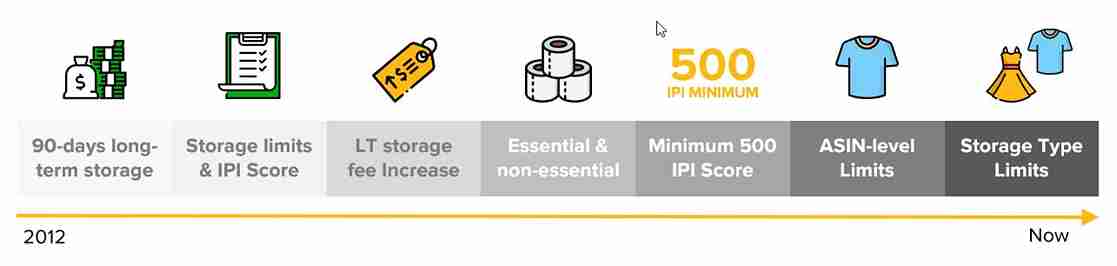
Amazon FBA sellers were already hit with 20-65% drops in their inventory storage limits in April 2021 when Amazon changed from ASIN-level quantity limits to storage-type quantity limits – and they’re now sweating even lower limits as the holidays approach.
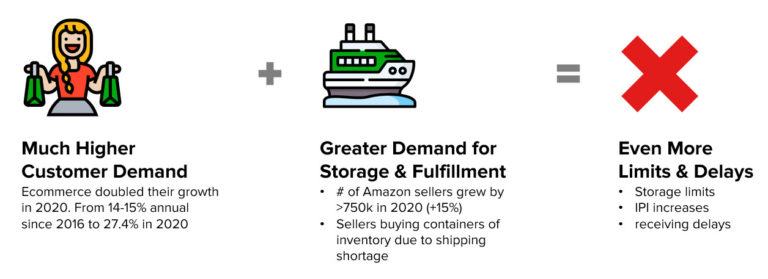
Amazon doesn’t publicize exactly how they calculate sellers’ limits, but sellers have been dismayed in recent weeks to see their restock numbers drop. FBA seller groups are lighting up with merchants whose holidays are all of a sudden in jeopardy – this comment on Telegram is emblematic of the challenge, “Hi, any advice on how to deal with Amazon decreasing restock limits to a third of what it was?”. The responses are befuddled: “Your IPI seems good”. What’s a seller to do?
On top of that, Amazon suddenly changed their Christmas receiving deadline from December 11th to December 2nd. The comments on the announcement, made October 8th, reveal a common theme.
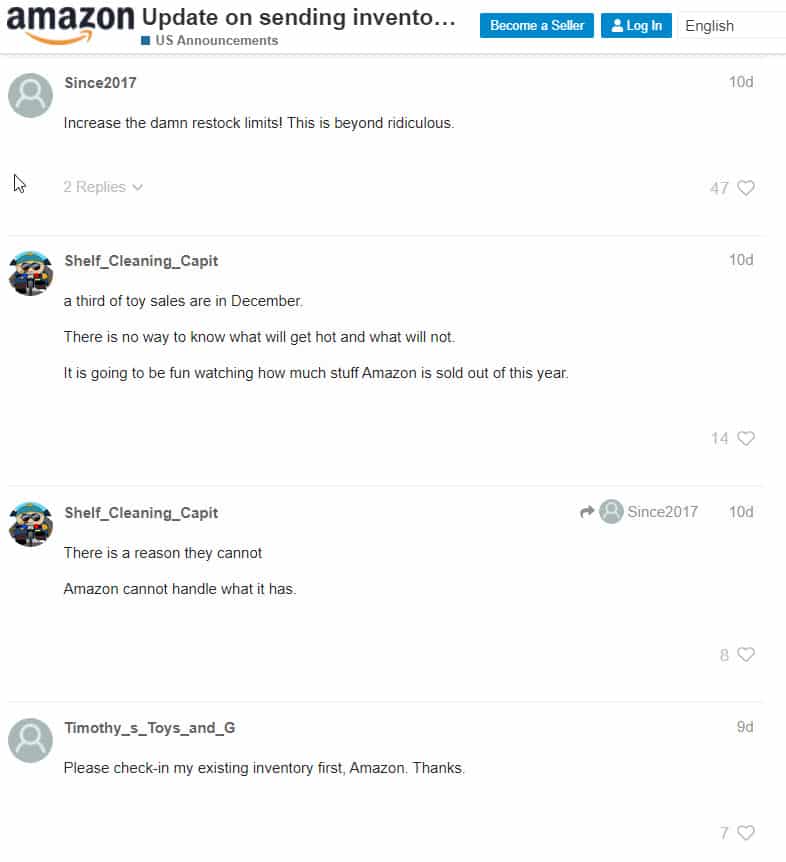
Frustrated sellers plead with Amazon to increase restock limits, but help isn’t coming. Amazon FBA’s history is instructive: over and over, they’ve made it harder to get inventory into FBA, not easier. This holiday receiving deadline is just one more seller-unfriendly change in a long history of negative changes.
How can merchants maximize their Amazon FBA IPI score?
If a seller is determined to only use Amazon FBA, then they need to maximize their IPI score to increase their inventory limits. The FBA Inventory Performance Index (as it’s known formally) measures how efficiently and productively Amazon sellers are managing their inventory. Our Amazon IPI deep dive tells you everything you need to know, but we’ve also included the critical information here.
IPI score is based on four factors:
- Excess inventory
- Sell-through rates
- Stranded inventory
- In-stock inventory
To be fair, reducing excess inventory isn’t the challenge on most sellers’ minds these days. Still, keep an eye on whether particular SKUs aren’t selling well and thus have months worth of product backed up in Amazon’s warehouses. Those are good candidates for removal or disposal orders, which immediately improve IPI score. When it comes to FBA inventory, the 80/20 rule is a bit different from normal: if just 20% of your SKUs are slow movers, they can still torpedo your overall score. You can’t get away with 80% effectiveness – you need 100%.
Next, look to maximize your sell-through rates to improve your IPI score and thus your inventory limits. It’s simple: sell-through rate is equal to the Total Sales of each ASIN divided by the Average Inventory Level of each ASIN for the last 90 days. Of course, every seller wants to improve their sell-through rate; this means lots of sales! The challenge, though, is that an improvement in sell-through rate means faster and faster replenishment orders. Sellers need to be ready to send replenishments as often as three or more times a week if they want to maximize sell-through rate.
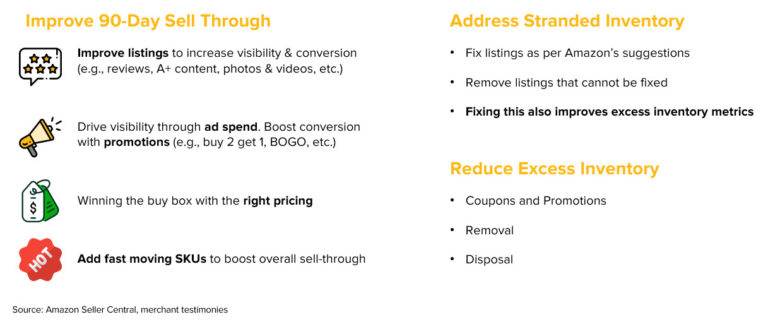
Stranded inventory hurts IPI score and is bad for business. Occasionally inventory in FBA gets inadvertently listed as FBM and thus gets stranded. Sometimes it’s a situation where the listing itself has been closed. It is also possible that pricing triggers an alert, and Amazon shuts down the listing to prevent it from selling outside of the minimum or maximum selling price set by the merchant. Keep a close eye on your seller tools and fix any issues with stranded inventory ASAP.
Finally, avoid FBA stockouts at all costs. This is an immense challenge in Q4, as sellers who have been increasing their sell-through rates become more and more vulnerable to a surge in demand (say, from the holidays). The surge can easily knock a SKU out of stock, which triggers a death spiral of lost search rank, lower IPI score, and lower inventory limits. There’s only one reliable way to avoid stockouts – duplicate Amazon FBM listings. With a duplicate FBM listing powered by the merchant or an FBA alternative, sellers can rest easy knowing that if there’s a run on their Amazon FBA stock, they can turn on their FBM listing and keep selling without risking their business.
How to use Amazon FBM to grow this holiday season
Amazon FBM isn’t just a good tool to grow on Amazon – it’s also the key that will unlock multichannel ecommerce sales. As we explained in the last section, Amazon FBM is a seller’s best way to avoid FBA stockouts and protect their Amazon business. On top of that, though, an excellent FBM approach will enable sellers to profitably grow on other marketplaces and on their own site. A recent Shopify study found that sellers on 3+ ecommerce channels boost their revenue by 200% – but Amazon Multi-channel Fulfillment (MCF) isn’t the answer to shipping for other channels.
First and foremost, fulfilling Amazon orders yourself or with an FBA alternative protects your holiday sales. The challenge for sellers trying to do it themselves is that unless they already have 4+ warehouses strategically placed around the United States, they either have to sacrifice fast shipping or free shipping. Offering 2-day shipping to the entire US from just one location puts the majority of customers in Zones 4 and up, which racks up incredible express rates – likely completely erasing margin. On the other hand, delivery times of 5-7 business days will lose customers left and right in the checkout stage, if they even get there. That’s why most sellers turn to an eCommerce order fulfillment platform to power their FBM.
The right eCommerce fulfillment provider won’t just ship your Amazon orders. The best have built easy integrations with all major marketplaces and shopping carts, so with next to no additional effort, sellers have a single operations solution to all of their sales channels. An effective multi-channel fulfillment and sales strategy will include a partner that powers affordable fast & free shipping. Customers expect fast & free shipping online, full stop. Sellers that meet that need see more impressions, higher conversion, and higher retention, so those that offer it on major marketplaces as well as their own site stand to gain the most.
Written By:

Jeremy Stewart
Jeremy Stewart leads customer success at Cahoot, helping merchants achieve high-performance logistics through smart technology and process optimization. With a background in both ecommerce operations and client services, Jeremy ensures that every merchant using Cahoot gets measurable results—whether they’re scaling from one warehouse to many or managing complex returns.

Turn Returns Into New Revenue
Related Articles

How Much Does Seller Fulfilled Prime Cost? Calculate It for Your SKU
Seller Fulfilled Prime sounds attractive until you start thinking about the bill.
Amazon AWD Size Limits Changed: What Bulky Sellers Must Do Before Q4 2026
Beginning July 31, 2026, Amazon AWD stopped accepting new sortable sellable units at or above 18x14x8 inches or 20 lb, so any unit that meets or exceeds those thresholds is no long...
Why Even a 4:30 PM Cutoff Cannot Solve Amazon’s 40% One-Day SFP Rule
An established ecommerce merchant shipping more than 20,000 monthly orders from Pennsylvania had already pushed its cutoff to 4:30 PM Eastern Time and was willing to use Next Day A...
3PL Fulfillment: Amazon’s Inventory Limitations & Impact on Ecommerce Sellers

In this article
 28 minutes
Listen to podcast here.
Podcast: The Future of 3PL Fulfillment in the Face of Amazon Warehouse Distribution (AWD)
In a conversation between Manish Chowdhary, founder and CEO of Cahoot and Neil Twa, host of the High Voltage Business Builders podcast, the two discuss Amazon’s inventory limitations and the impact it has on ecommerce sellers. Amazon has different teams with different priorities, causing confusion among sellers who cannot rely on any one order fulfillment solution. The company has cut down on inventory shelving space for some ecommerce sellers while launching new services, such as Buy with Prime, which could pose a threat to marketplace delivery services like Shopify. Shopify recently banned Buy with Prime, which Manish argues cuts into the heart of revenue. To avoid being beholden to any order fulfillment service, sellers must have a backup that is not Amazon. The experts caution against putting all your eggs in one basket and encourage ecommerce sellers to move beyond Amazon if they want to grow their ecommerce brand.
Below is the transcript of their conversation, edited for clarity:
Neil Twa:
Welcome to the High Voltage Business Builders, a show where we interview entrepreneurs growing and scaling their income through e-Commerce and showing you the path to make your first or next million.
All right, Manish, thanks for joining the call, my friend, from Connecticut today. How is things out there on the East Coast for you?
Manish Chowdhary:
Things are a bit cloudy here, but it’s still a great day, and thank you for having me, Neil.
Neil Twa:
Yeah, it’s great to have you here, man. So, we’re talking a little bit about things that are obviously relevant to E-comm, but in different channels, not just Amazon. I know you handle multi-channel fulfillment.
Let’s talk a little bit about that, because I know it’s a big piece of what you do in your business model. Tell us what are you seeing, what’s most relevant right now. If someone’s listening to this and they’ve got a Dropshipping or an Amazon store or some other thing else, what’s something they should know right now that you feel is important for them to hear?
Manish Chowdhary:
Well, one of the things that… I just got back from Search Summit last week, you hear conflicting sets of information, right? I mean, Amazon is rolling out new services. You brought up a little while earlier, Amazon warehouse and distribution. So they’re ready to take on everything. Then I hear from a very large seller, very successful seller, just two days ago that their inventory limit has been cut to 1/3rd (of what it is presently).
Yeah, one side, Amazon is ready to take on everything you’ve got, and the second side is the people that are in need of that inventory today don’t have that. So Amazon has different teams working. You really can’t believe one thing or the other, because they’re all just simply trying to get in the limelight. So, it’s a lot of confusion out there for sellers.
Neil Twa:
Yeah, there is definitely, because they said, “We’re going to do 5% of you only (whom they said they would reduce inventory for). We’re going to have to make some holiday changes, we got inventory issue.” Now if I just look at our group, our businesses and we come back, there was more than 5% of the people in our group who got that notification just within our group. So I’m like, “Well, I don’t think that was quite 5%.” I think they kind of just placated those numbers just a little bit.
So they killed it on one end by halving down the shelving space we had on one side of the house, and then they’d say, “Hey, well, we got this new Amazon warehouse distribution (AWD) thing, and you could have unlimited storage over here all of a sudden.” It’s kind of like, “Well, I mean, were you playing the shifting shelves game here?” What do you think is going on?
Manish Chowdhary:
Well, I mean, again, Amazon is a very large company. There are different product owners, each one has their own agenda, so they may have gotten certain amount of space allocated. There’s also Amazon launched Buy with Prime service that is probably also run by a separate group, that they’re ready to take on order fulfillment for Shopify merchants or just about anyone.
So, it is very unnerving if you are a seller like yourself or people in your group, that if you see your inventory limits cut down, what confidence, what trust would you have in other services? So one thing that we at Cahoot like to educate our sellers or give them advice on is that you’ve got to have a backup, and it cannot be Amazon.
Amazon cannot be Amazon’s backup. You’ve got to have an independent third party that has your interest in mind, that is going to help you navigate the turbulent Amazon waters, and that’s not going to end anytime soon. It’s not a Q4 issue, it’s not a Q1 issue.
As long as you play in the Amazon ecosystem, that will continue to remain a challenge no matter how large, how many services they roll out.
Neil Twa:
Yeah, it’s a very valid point, and I love the way you speak Manish, because you’re a very pragmatic guy. I can tell in the way you look at these things. Because obviously with adding the Buy with Prime button, it’s added on a whole additional line of sellers from Shopify and other stuff, which I don’t know if they were aware maybe of what that would do. I know a lot of people have suddenly implemented that. I know for sure they’re going to take over a lot of Shopify’s opportunity for marketplace delivery they were trying to bring up.
Manish Chowdhary:
Well, but Shopify just came out last week I think, and banned it. So Shopify has publicly gone on record to say that installing the Buy with Prime button is against Shopify’s terms of service. So there you have it. Shopify wants to ban Buy with Prime, Buy with Prime wants to get on Shopify. Nobody wants to take FBA forwarding. It’s a big challenge if you’re a seller, you just cannot be beholden to any platform centric order fulfillment option.
Neil Twa:
And there it is. So we talk about pros and cons, and we’re very open about both of those things with Amazon, we don’t want people to be Amazon channel locked. So you need to move a brand beyond Amazon if you start there and incubate it or if you’re off Amazon, obviously you need the combination of the multi-channel aspect really for E-comm today. But like you said, you can’t put all your eggs in one basket, and as soon as you have the opportunity to split out profits, you should move another channel, another opportunity. I didn’t actually hear that update on Shopify, so that’s interesting news. I can see why they would do it. The marketplace is getting extremely competitive, and that opportunity was going to cut into their delivery systems, they were trying to ramp up.
Manish Chowdhary:
Well, it’s not even delivery system. It cuts into the heart of their revenue.
Neil Twa:
Well, for sure, for sure. I mean, you can see why we do these kinds of things and have these kind of conversations. If you’re out here just trying to flounder around on your own. For us, having the experience levels we do, and you too it’s even confusing at times to try to rationalize this stuff in the middle of all the experience we have versus people who are just trying to get going. So if you’re new and you’re just like, “Okay, I got an Amazon channel, I don’t necessarily have a 3PL yet, or I’m looking to get one.” What are the top three things you want people to know when they’re looking for a 3PL company that they should consider? What are the things they should know about it?
Manish Chowdhary:
First and foremost, I think it’s very important to make data-driven decisions. A lot of sellers just simply reach out to 3PLs and we get many of those inquiries. “Give me a price rate card.” Most 3PLs specialize in something. Not everyone specializes in everything. There’s micro – What we call mom-and-pop 3PLs. These are one location, two location, 3PLs, and then there are chains, and then you have networks like Cahoot. So it’s very important for the 3PLs to understand what kind of products are they going to deal with, what’s the inbound and outbound frequency, what kind of services you’re expecting, what is most important to you if you’re simply looking for an FBA forwarding service, or are you looking for DTC fulfillment? What kind of products, because there’s the shipping cost.
I’ll give you a very simple example. You can get dirt cheap order fulfillment, let’s just say even in the hottest market, Southern California, let’s say dirt cheap storage. But if most of your orders are going to New York or the East Coast, you are going to pay Zone 8 shipping prices for moving that item from California to New York on an individual basis. So net net, you actually will lose money even though you thought you got a great deal. Those things are very important. If this 3PL is going to take one or two days extra to ship from a lead time or if they’re going to use downgraded services, that will take longer for the consumer to receive. All of those things are very important to understand upfront as to what are you trying to solve for. And that is one thing that is very important. At least at Cahoot, we don’t blindly hand our pricing because we don’t know if we are going to be the best fit and only information and data tells us whether we are going to be the right fit.
So I would encourage sellers to really think about – how many SKUs? What kind of orders are you fulfilling? The count of orders? Let’s do averages over the last six to 12 months to make sure what’s the typical inventory storage requirement? How long do you store that inventory for? And having all that information and what the shipping cost is going to be, because many 3PLs do not do that. They charge the shipping cost, so you could lose a lot of money on that front. And how does it compare to FBA trying to make any comparison with FBA? So you know exactly for what products you’re going to come out ahead, what products are going to cost more. Because we going to admit FBA is very competitive for Small and Light, very attractive. So anybody who tells you they’re going to beat FBA prices across the board, they’re most likely lying.
Neil Twa:
Yeah. Because of this infrastructure, their multi-channel services usually can win to some degree. You just have to look at it from a strategic perspective and not the lowest race to the bottom pricing. Because I know that’s what happens to a lot of those people with rate cards is they’re selling $10, $12 products and they’ve got razor thin margins and it’s hard to beat Amazon’s FBA pricing at that level because they’re already at razor thin and Amazon’s trying to beat all the competition for pricing. So you got to be smart about your numbers. And usually people who are just asking for rate cards don’t really know what their numbers are. And they may not even know what Zone 8 means if they’re listening to this. But guys by the way, that’s the farthest distance from one location to another at shipping costs.
If you’ve ever tried to ship something and like US Postal Service go down and look, they have a Zone card and you’ll notice some of the locations are some of the farthest away, and you got to be smart about where your sales are coming from. If you’re on DTC, it’s a little easier. You can do a quick analysis and see where’s the majority of my orders going to from people who are buying. On Amazon, you got to wait a little bit and figure out where Amazon’s distribution is sending all your products into which areas you’re getting the most sales from, which may take a little bit of time from the system. But obviously, Manish, you know your stuff. I mean, just listening to you for the last five minutes. You clearly understand this. What is your background in this business model?
Manish Chowdhary:
So I was involved with building the e-commerce platform before the word e-commerce platform was invented. This is going back to early 2000. I was involved with building one of the first Turnkey Shopping Cart Software long before Shopify existed. Magento wasn’t on the market at that time. So built a very successful Shopping Cart Software, Turnkey e-commerce platform as we see now. So I’ve seen e-commerce evolve from its infancy. And then went on to build another similar product, but it’s a full service mid market e-commerce order management system, inventory management system. So I’ve been dealing with online retailers, technologies God, for 22 plus years. So I’ve seen everything and just about anything. I’ve got deep experience with now logistics. I’ve got 10 US patents on business process, orchestration and collaboration. So a lot of experience in anything and everything to do with e-commerce and operations.
Neil Twa:
Yeah, no, that’s a very historic background. I mean, back to 2000, is post dot-com bubble. Did you get out of the bubble somehow into this or did you ride that out okay or what happened there?
Manish Chowdhary:
Yeah, I mean, I think we did phenomenally well because that was the time when e-commerce was just taking off. And I think some of the large, the eToys of the world, they pretty much laid the foundation for the SMBs. SMBs were getting on for the very first time, just like the pandemic did, brought in a ton of people who started to sell online. But in this case, there were businesses that were offline, the brick-and-mortar that suddenly saw themselves as an opportunity to sell online. And this is actually, I think this was before Amazon opened itself up as a marketplace. Amazon marketplace did not exist. Yahoo Shopping used to be the marketplace. May or may not remember that.
Neil Twa:
No, I do. But the eToys thing is taking me back in my brain for a second. I haven’t heard eToys in a long time.
Manish Chowdhary:
Yeah, so those were the early days. So I’ve seen the evolution of that. So I mean every time there’s a crisis as they say, or there’s a challenge, there’s an opportunity. I mean, right now we are going through some historic black swan event with the pandemic and so on, but I think there’s some great businesses that are going to emerge out of this. I mean, yes, for my own business, which is Cahoot, it’s an innovative peer-to-peer order fulfillment services network. For the very first time, if you are a merchant who has a warehouse, you have an opportunity to make money if you have excess space in your warehouse. This is something that did not exist. Similar to what Uber and Airbnb did in 2008 when the financial crisis hit. All of a sudden people were without jobs. So they were going and signing up to become drivers for Uber, which allowed Uber to offer low prices for short-term transportation, which really helped them take off.
Similarly, Airbnb also emerged during that time when people were trying to save on short-term stays. They don’t want to pay large, heavy amounts to the Hiltons and the Marriott’s of the world, and there was a great opportunity for them to monetize their spare bedroom. And so Cahoot is doing something very similar in the order fulfillment and logistics space. So if you have a warehouse and you have your act together and you’ve got spare capacity, for the very first time you can come to Cahoot, join our network and apply to become an order fulfillment partner and make some money.
Neil Twa:
So peer-to-peer order fulfillment services network, that’s new, that’s very innovative.
Manish Chowdhary:
Thank you. Thank you.

Neil Twa:
Yeah. Obviously your innovations and patents and other things have led you to some really new concepts. Where do you see that moving in the next year with some of the challenges around order fulfillment, longer shipping times? Where do you see that going?
Manish Chowdhary:
Yeah, I mean, I think that the order fulfillment companies should be embracing what I call merchant inclusive fulfillment. If you think about a merchant’s needs, a merchant wants to bring in inventory, whether it’s domestically or international. The inventory is going to come into one of the bigger ports. There are some of the less popular ports that I recommend right now. If you’re having trouble getting inventory to Long Beach or Oakland at New York, New Jersey, you can look into Charleston, you can look into Miami, you can look into some of the other ports that are less congested. I mean, I think merchants want a single provider that can handle their B2B, that they can stage their inventory and then drip it to FBA as needed for the items that make sense. They can do the order fulfillment for other channels, Shopify, Walmart, others, I know Walmart launched its Walmart fulfillment services.
Lot of sellers are not super excited about that. They still find that to be in early stages and infancy in its technology evolution. People are going and rushing to build new warehouses. But we believe that there are 2 million merchants in the US. Many of them do order fulfillment on their own, that there’s plenty of capacity available, just like how Airbnb helped unlock millions of rooms as opposed to going out and building new hotels in an already crowded space. When somebody builds a very expensive warehouse, they’re going to charge you something very expensive for their services because they got to recover their expenses. So Cahoot is very unique in that way to leverage existing assets so that we can get higher utilization for what already exists.
Neil Twa:
Fantastic man. And if I’m not wrong, it’s cahoot.ai, is that correct?
Manish Chowdhary:
Cahoot.ai, yes.
Neil Twa:
Okay. And when they show up, what should they expect to give you to get the right information necessary? And we’re talking about sellers who are already in the marketplace in one capacity channel or another, but we’re also talking about those who have additional warehouse space, maybe even other 3PLs who might want to utilize that space, if I’m hearing you correctly, can connect with you as well. Is that right?
Manish Chowdhary:
That’s right. We have two parts of our network. The sellers that are looking to outsource order fulfillment, they can come to Cahoot. If you have a great deal, come out to Cahoot, let us reconfirm that you still have a great deal, no harm done. It’s something to be aware of. Or if you have one location, you want to add a second location because you’re getting orders from nationwide. We have the technology, the software that can make that happen seamlessly. And if you’re super happy with your existing provider, we are not looking to replace them or displace them. That’s just not the way how Cahoot operates. We would invite them to come join the Cahoot network so they can participate and they can stay part of it. Because if you have got a good thing going, we know we have the technology to glue it all together.
And on the supply side, if you are a warehouse that has excess capacity that you want to monetize, then you come join and apply to become an order fulfillment partner. And we invite 3PLs as well to come join as a fulfillment partner. Because let’s face it, let’s say you are an East Coast based 3PL, your customers, your merchants are demanding a location on the West coast. So rather than losing that client entirely, you can come and partner with somebody so you can keep that client and meet that client’s needs. Because if you choose to ignore that client’s needs, because to your point, Neil, Zone 8 shipping from New York to California Zone 8, that’s very expensive however you slice it. And even if your fulfillment providers rates are the cheapest, you are still going to come out in the red because shipping orders cross-country has two problems, higher shipping cost, and longer transit time.
It takes five days for the item to be delivered, sometimes could be up to six, seven days. So we invite both 3PLs and warehouses of capacity to come check us out, apply to become an order fulfillment partner, and for the sellers to look out and find a merchant inclusive fulfillment solution. You got to have a backup. And I’m talking about the seller, Neil, that I spoke with last week. Sellers in the Amazon space – they are plugged in, they’re super smart, you would know them, even they don’t have a backup. And it’s appalling to me that how can you put all the eggs in one basket?
Neil Twa:
Once you get to be a certain size – Risk management needs to be a big part of your operational component. I would be surprised that they didn’t have some of that in place, but I’m sure they could help you. You’re obviously got an innovative, unique idea for both seller and 3PL. And folks, if you’re listening to this, I would encourage you to check it out. The link will be in the show notes, go to cahoot.ai, check out what Manish is doing. Obviously, you can hear he’s a super smart guy who’s figured something out that’s really cool. It will benefit both you and the 3PL provider you might be using at this point. Guys, I would encourage you to go check it out and take a look at that if both, again, you’re a seller and a 3PL. Manish, any other final words of wisdom you want to leave on us today?
.
Manish Chowdhary:
Thank you, Neil. I mean, there’s one more thing in the words of Steve Jobs.
Cahoot has the industry-leading shipping software. So if you are not ready to outsource fulfillment and you have a warehouse, you do order fulfillment or shipping yourself, Cahoot can save you a lot of time in rate shopping. We did a side-by-side comparison between ShipStation and Cahoot, which is a leading product on the market. And of course, as they say, Cahoot came out 21 times faster, that’s just the technology that Cahoot has built that reduces human error. It reduces a human trying to compare UPS, FedEx, USPS rates, figuring out which one to pick. And rather than doing it one order at a time or applying any kind of crude rules, Cahoot’s technology automates all of it. So if you want many hours back in your day, and I kid you not, we have a client that was spending four hours on a Sunday away from their family printing labels so that they could ship those orders out on Monday and they could not fulfill Monday’s orders until Tuesday because they just did not have the capacity.
And so there’s some unique technology even on the shipping software front. If you can save three hours, four hours of labor a day that’s money back in your pocket to do some other things that are more revenue producing.

Neil Twa:
Very smart and interesting angle on that. Definitely. So a shipping station comparison is a very good analogy for what your software does and obviously it’s very powerful. We may have to check that out ourselves, for some of the projects we’re working on. Thanks for bringing that up, man. I appreciate your time today, sir.
Manish Chowdhary:
Thank you. Neil, anything else you’d like to cover?
Neil Twa:
Look, that’s good for me at this point, unless you have something else you would like us to know.
Manish Chowdhary:
No, I mean, I think just merchants should be aware that Amazon FBA has added peak fulfillment surcharge of 6 to 8% for the very first time. That’s I think getting rolled out on October 15th. That’s a fourth increase in FBA fees this year. I think in the first quarter they revamped the Small and Light pricing. April 28th they added 5% inflation surcharge. And then of course the storage triples in Q4, as you know. So I would encourage sellers to go check out their bills and to make sure that nothing in the Amazon FBA world remains as is. So be mindful of that as you’re calculating your profitability, how much you’re allocating to your advertising, return on advertising spend and all that good stuff. And some other big news, I mean, Pharmapacks the number one Amazon seller going out of business –
Neil Twa:
Yeah. Their margins were too thin. And I was just going to cover a little bit of that actually, because on the antithesis side of that, one of the third largest native acquisitions just occurred for a cosmetics company in a $630 million acquisition. So on the other side, you got to look at the differences between the two. Why did one go out of business, and why did one have such a tremendous exit? And then how to deal with the rising costs of obviously inflation or fees, obviously, as you mentioned are going up.
And that’s a good topic because I mean, you got to look at the value of the brand and the value of the products you’re putting into it. That’s one of the things we always drive out here. If you’re going to sell something for $30 or less on Amazon, you better have a very high margin on it or not sell anything less than $30, or you’re going to run into these kinds of really razor thinned margins where you might be making it great or it cost is good, and the product is growing, but all of a sudden that 5% surcharge or changes at this fourth quarter of the year slice your margins down to a dollar in profit, which is really no for a business model.
So we want to encourage everybody on the back of that to remember, keep your product profitability above $10, if not higher to $15 in that profit per unit for your products. If you can’t achieve that on your products currently, you need to get products in the market that will do that. That will raise with price, can raise retail price against inflation and market hedges or of course increasing costs and operations and logistics as we just spoke about, won’t impact you as greatly. Yes, they’ll impact you, but it won’t be devastating. And I know there’s a lot of sellers in the market right now that are going to face that coming into fourth quarter.
As you mentioned earlier, there’s opportunity in everything. For some of us, there’s going to be great opportunity priced correctly and in the profit margins we need, whose fourth quarter this year is going to be great. But I think there’re going to be a lot of sellers who are coming off of a COVID bump who still haven’t right sized their metrics or expectations and rising cost of inflations are going to hurt them in this coming quarter. And many of them may not be able to make it through the end of the fourth quarter, even though they should be doing really well.

Manish Chowdhary:
Right. And business metrics have changed. I mean, if you’re looking to get acquired, that brings massive challenges of its own. Profitability is going to be key. The other advice that we are giving sellers is don’t wait for the last minute. Holiday shopping is going to happen earlier. There’s of course, a lot of talk about a second Prime Day. I mean, just think about it, why is Amazon considering a second Prime Day? It is because they want to push holiday forward. They want to push spending forward because they’ve got tons of excess inventory. We’ve heard from Walmart, lots of inventory challenges, aggressive discounting happening at Target. Their profit plummeted 89.9% year on year.
Neil Twa:
Yeah. Target is taking big hit, no doubt.
Yeah. And you mentioned Walmart – literally yesterday, I saw an article that said Walmart removed some of the major restrictions. It was making it very difficult for third party sellers to get approved on their platform. And in one day they had the largest spike in signups they’ve had to date since they opened the Walmart ecommerce platform. Because now you can actually get over there and open up your business, which is your name and your business in a few other details now. Whereas before it was highly restrictive. So there may be some additional opportunity for folks looking at Walmart because it has a market potential opportunity.
But you’re right, there are others that they’re suffering for a lot of different reasons. You bring up Target, but Target’s isn’t just operational or profitability. They’ve got other geo and political problems hitting them due to some policies and stuff that affected them, I believe. Just look at the market and the trends, and you can see what I’m talking about. But in terms of market share and stuff, the latest studies show that the even Walmart and Target combined still don’t make up Amazon’s 38% of market share. So if you’re going to play in the market, go with the juggernaut. Right?
Manish Chowdhary:
Certainly, certainly, but also diversify because if you’re successful at one marketplace, you want to dip your toe in the other.
Neil Twa:
Yeah, hints the Walmart point. You can get into Walmart a lot easier now due to those restrictions being lifted. Yep. So you should definitely consider it.
Manish Chowdhary:
That’s right. That’s right.
Neil Twa:
Yeah. Manish, thank you so much for your time, sir.
Manish Chowdhary:
Neil, thank you again for having me and pleasure speaking to your audience and if I can be of any help, please go check us out at www.cahoot.ai.
Neil Twa:
If you like this episode, please share it with people you think will enjoy it as well. Thank you for listening and be sure to tune in next week for a brand new episode of High Voltage Business Builders.
Written By:

Indy Pereira
Indy Pereira helps ecommerce brands optimize their shipping and fulfillment with Cahoot’s technology. With a background in both sales and people operations, she bridges customer needs with strategic solutions that drive growth. Indy works closely with merchants every day and brings real-world insight into what makes logistics efficient and scalable.
Turn Returns Into New Revenue
Related Articles
How Much Does Seller Fulfilled Prime Cost? Calculate It for Your SKU
Seller Fulfilled Prime sounds attractive until you start thinking about the bill.
Amazon AWD Size Limits Changed: What Bulky Sellers Must Do Before Q4 2026
Beginning July 31, 2026, Amazon AWD stopped accepting new sortable sellable units at or above 18x14x8 inches or 20 lb, so any unit that meets or exceeds those thresholds is no long...
Why Even a 4:30 PM Cutoff Cannot Solve Amazon’s 40% One-Day SFP Rule
An established ecommerce merchant shipping more than 20,000 monthly orders from Pennsylvania had already pushed its cutoff to 4:30 PM Eastern Time and was willing to use Next Day A...
Buy with Prime Extends FBA to DTC Ecommerce

In this article
8 minutes
This past Thursday, April 21st, Amazon launched a new service: Buy with Prime. For a fee, the service will let third-party ecommerce merchants use Amazon’s huge distribution network to fulfill orders on their own sites. It’s Amazon fulfillment for DTC sites.
On top of that, Buy with Prime web sites will be allowed to put the Prime badge on their websites next to items eligible for free 2-day and 3-day shipping (which will be most items), helping boost their conversion.
And finally, Amazon Prime members that purchase from third party sites that use Buy with Prime will have their payment and shipping information pre-loaded in the checkout window, further smoothing the conversion process and decreasing cart abandonment.
In this article, we’ll share what we know so far about the service and dive into pros, cons, and fulfillment service alternatives for sellers.
Who Benefits from Buy with Prime?
Amazon is targeting Buy with Prime firmly at online sellers with DTC stores. While Amazon previously offered its multi-channel fulfillment service to DTC sellers, this new offer seems in many ways to be a direct replacement, and we anticipate that they’ll slowly phase out Amazon MCF in favor of Buy with Prime.
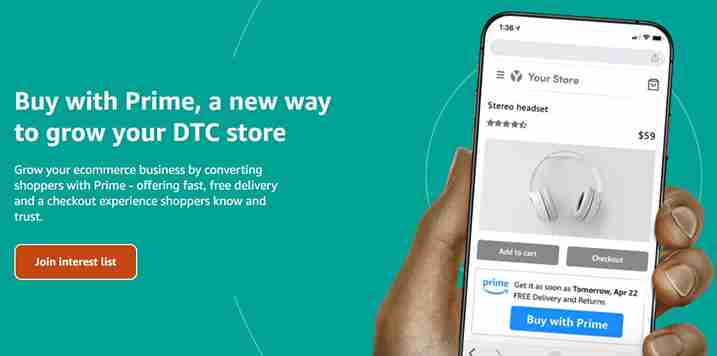
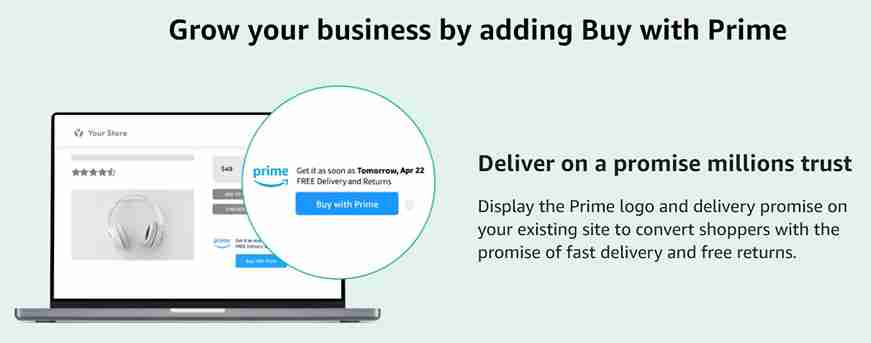
While Buy with Prime is currently invite-only, Amazon’s new website for the program clearly demonstrates who they think will benefit most from using it. As you can see in the below screenshot, they’re positioning it as a way that DTC sellers can grow their business.
Buy with Prime asserts: if you’re a DTC seller, you can stop worrying about fulfillment and delight customers with fast and free shipping by signing up with us.
It stands to reason that this will become and remain Amazon’s fulfillment solution for direct-to-consumer online sellers, but that it likely won’t grow further. It would be remarkable if other marketplaces like Walmart or Target integrated with Buy with Prime (at least for the time being), and we’ll be very interested to see whether a critical mass of Shopify or BigCommerce sellers jump over to Amazon’s new service.
Shopify fulfillment network recently significantly drew back its ambitions, but in its place, Shopify has quickly pivoted to talks to buy a rival fulfillment service. If Shopify makes such a large investment in a fulfillment network of its own, it likely will want to shut Amazon out of its user base in favor of its own solution. As it stands, it’s an open question as to whether Shopify sellers will be able to use Buy with Prime.
We’ll keep a close eye as the situation develops, because multi-channel sellers know how painful it can be to have to manage multiple fulfillment solutions. Amazon is making a big play to extend FBA across more of the ecommerce landscape, but its competition isn’t standing still.
What Are the Drawbacks?
Buy with Prime promises to solve checkout and fulfillment for DTC merchants, but convenience will come at a price. Sellers trying to make it on their own or pursuing a multichannel ecommerce strategy enjoy significant benefits from their strategic distance from the big marketplaces, and implementing Buy with Prime will blur those lines and risk losing more than you gain.
Amazon Owns Your Customer
If Amazon gets their logo on your checkout process, and the customer converts because they feel more comfortable with Amazon, who really owns the customer? Or worse, will the customer even stay on your site?
Many DTC sellers have built brands and struck out on their own because they want to get away from Amazon and its questionable business practices. By owning their customer, they build long-term relationships that lead to repeat purchases and realize significant long-term customer value, the basis of sustainable profitability.
Source: buywithprime.amazon.com, 4/26/22
By bringing Amazon back into the mix, DTC sellers risk all of their hard work in developing a unique relationship with their customers. Fast and free shipping does boost conversion, so you may see a boost from new customers – but with Amazon’s logo doing the heavy lifting, you’re also giving customers the idea to head over to Amazon to price check and look at competitive offers.
Well over half of online product searches already start on Amazon. Do you really want to give shoppers the idea to pop over to the ecommerce giant after you’ve done all the hard work advertising to get them onto your site?
Pay Hefty Amazon Fees
In Q4 2021, Amazon made $30.3 billion from third-party seller services, which includes commissions, fulfillment, and shipping fees. While we don’t yet know the full fee structure of Buy with Prime, all indicators point to the company trying to turn this into the next Amazon Web Services. After all, in recent years Amazon has continued to lose money on its core retail business, while it makes up for it with huge profits from AWS and its advertising business.
AWS famously started as an internal service to run Amazon’s business before they productized it and started selling it to the world at large. Amazon FBA is now following the same exact path: it started as a way for Amazon to fulfill their own orders, then they extended it to third-party sellers, and now they’re expanding to DTC merchants. We anticipate that they’re targeting significant margins with this new business – perhaps they could even rival AWS’ 60%+ operating margin.
With this model, DTC merchants will feel the crunch in their own profitability. In exchange for increased conversion thanks to the Amazon Prime badge, they’ll realize lower margins. If the extra revenue doesn’t flow through to the bottom line, is the service worth it?
Competes with Your FBA Inventory Limits
Finally, if you’re a multichannel seller trying to win on Amazon and on a DTC site, you don’t get two separate inventory limits. All of your FBA and Buy with Prime inventory goes into one pool, and where an order is placed doesn’t make a difference.
While this is helpful in its simplicity, it’s a big potential challenge because Amazon is notorious for imposing too-strict FBA inventory limits and for long receiving delays. With all of your eggs in the FBA basket, you make yourself extremely vulnerable to a self-serving change in inventory limits or one of FBA’s routine weeks or months-long receiving delays.
The best fulfillment practice for Amazon-only sellers is to have an FBA alternative for the many times when FBA falls flat, and that will be doubly true for Buy with Prime users. If you’re selling on Amazon and on a DTC site, and a receiving delay knocks your best seller out of stock, that now doesn’t just kill your Amazon sales rank – it also kills your DTC store’s SEO and paid advertising efforts!
Though Amazon is positioning Buy with Prime as a holistic solution for DTC sellers, we assert that relying wholly on Amazon FBA would be a fatal mistake for your business.
The Buy with Amazon Prime Alternative: Cahoot
Cahoot has created a robust
If Buy with Prime’s promise of a simple multi-channel answer to fulfillment appeals to you, contact us in addition to sending in your application to Amazon.
Cahoot is the next generation of tech-enabled fulfillment networks. Unlike other networks that are collections of 3PLs, Cahoot’s innovative approach empowers merchants across the country to fulfill orders for one another. Our peer-to-peer network is a collective of highly vetted eCommerce retailers who offer up excess warehouse space and resources to provide high-quality order fulfillment to other merchants. Since they fulfill their own DTC orders, they know how important top-notch fulfillment is, and they put the same care and energy into your orders as they do for their own.
As a result, costs are typically lower than what you get with a traditional 3PL fulfillment company, yet service levels are higher. With a P2P network, multi-channel fulfillment with nationwide 1-day and 2-day delivery at economy shipping rates is the norm. Merchants can use the network solely for outsourced fulfillment – similar to FBA, or they can choose to fulfill orders for other merchants and offset some of their own outsourced fulfillment costs.
Written By:
Jeremy Stewart
Jeremy Stewart leads customer success at Cahoot, helping merchants achieve high-performance logistics through smart technology and process optimization. With a background in both ecommerce operations and client services, Jeremy ensures that every merchant using Cahoot gets measurable results—whether they’re scaling from one warehouse to many or managing complex returns.
Turn Returns Into New Revenue
Related Articles
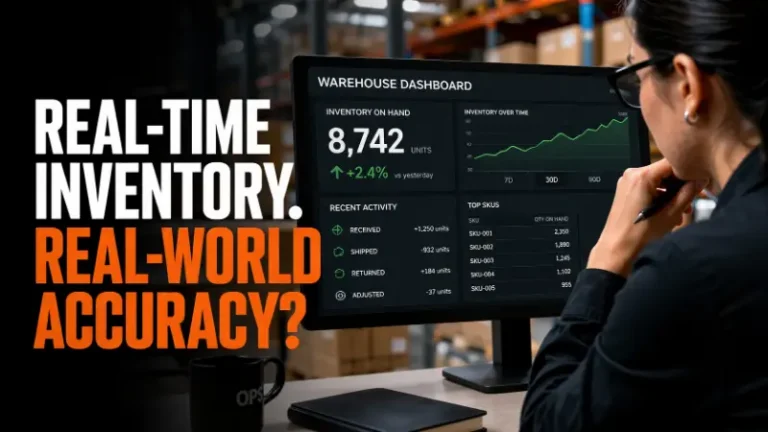
What Is a Perpetual Inventory System? How It Works in Ecommerce
A perpetual inventory system is an inventory management approach in which stock levels are updated continuously and automatically every time a transaction occurs.
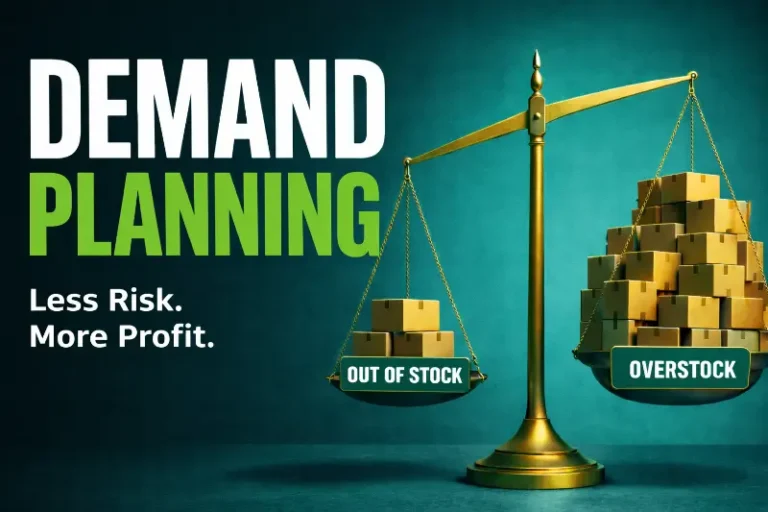
What Is Demand Planning? How It Impacts Inventory, Forecasting, and Profitability
Demand planning is the process of estimating future customer demand so that a business can align its inventory, procurement, and operations to meet that demand without carrying mor...

The Shipping Speed Paradox: Why DTC Brands Are Slowing Down
Everyone’s talking about faster delivery.
Top 3 Alternatives to Amazon FBA

What’s not to love about Amazon FBA? List your product on Amazon, send them your inventory, and reap the rewards of the Amazon Prime badge and low shipping costs (though FBA fees are rising again). Sellers need to monitor fulfillment, storage, inbound placement, and other FBA-related fees closely.
It can be a great deal for small and light products, but sellers need to be aware of rising FBA fees, and that it’s limited in two key ways: 1) it’s an inflexible point solution, and 2) Amazon frequently changes the rules, mostly to its benefit. Also, Red Stag Fulfillment reports that Amazon adds over 500 new 3rd-party sellers a day in 2025, so FBA often struggles to keep up with demand on both the receiving and fulfillment side of the logistics operation. Amazon’s response is to limit FBA to work well only for the SKUs that maximize its profit (not the sellers’) and to impose restrictive inventory limits.
Sellers that want to grow both in and outside of the Amazon marketplace will need an alternative to FBA to keep their growth engine humming. Read on to learn more about what to watch out for with Amazon FBA and your options for other ecommerce order fulfillment solutions.
Why You Can’t Rely on Just Amazon FBA
Amazon FBA will do a great job of fulfilling a portion of the volume of your small SKUs sold on Amazon, but it falls short otherwise.
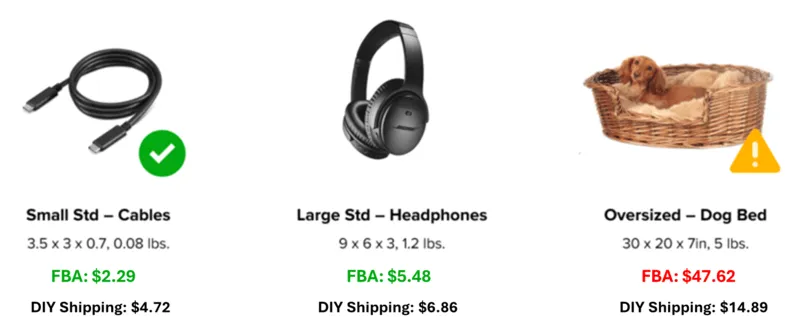
Source: Amazon FBA Revenue Calculator, DIY Shipping estimated using Cahoot discounted shipping rates for Zone 4 Residential addresses.
The above example is typical of Amazon FBA fees: their price for small and standard items beats other options, but even slightly oversized products like the example 5lb dog bed ends up costing more than triple the price that a merchant could ship on their own (or using outsourced fulfillment services). The reason is simple: they’ve optimized their network for small, easy, and efficient products.
As a result, Amazon sellers who use FBA for their shipping are boxed in when it comes to growth, and they all compete with one another to sell the same small, cheaper items. If FBA is your only good option, you can’t profitably expand your product line to larger, less competitive options because fulfillment fees will eat up your margins, making a 3PL a necessary consideration. If you raise the price to compensate, then you’ll lose to the savvy merchants who have diversified their fulfillment strategies and can get the product to the customer at one-third the price.
The challenges don’t end there for Amazon FBA. Ecommerce’s year-over-year unprecedented boom in growth through the pandemic has delivered massive returns to Amazon and Amazon sellers, but it’s also left FBA bursting at the seams. To compensate, Amazon switched from ASIN-level inventory limits to product-type inventory limits, and overnight sellers saw their inventory limits cut by up to 65%. To this day, Amazon still enforces restock limits based on broader storage types rather than individual SKUs (e.g., standard-size, oversized, apparel, footwear), applied at the account level rather than per-product. These remain the primary structure for restock limits in 2025.
However, recent trends indicate that Amazon has quietly reinstated some ASIN-level restock restrictions on top of storage-type limits, especially during periods of high demand or for seasonal products. These additional thresholds mean that even if your total storage capacity is sufficient, a specific ASIN may be capped based on the seller’s historical sales and forecasted demand. These mixed restrictions are reported to be in effect as of mid-2025.
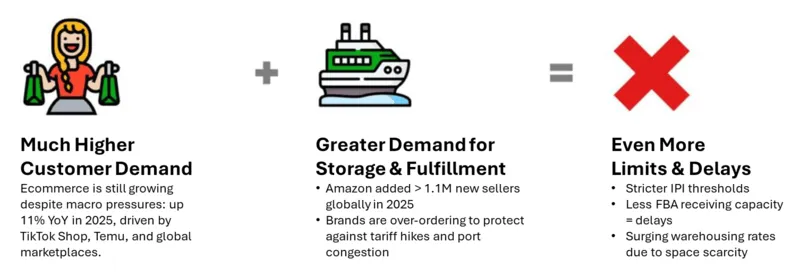
Source: US Census Bureau, Marketplace Pulse, Cahoot interviews with merchants
On top of the storage limitations, Amazon FBA can also take three or more weeks to receive inventory. This creates a huge window of time in which a seller can run out of stock on a key item, even if the seller sent a timely replenishment. And this assumes you chose the more complex and potentially more costly inbound path of distributing inventory across multiple destinations, rather than sending it to a single destination and paying Amazon’s inbound placement service fee for distribution. In the peak selling season, this is an even bigger problem. Demand surges can easily run an item out of stock in a matter of days or even hours, triggering a death spiral in which a product loses its search rank, which lowers impressions and conversions, which in turn lowers inventory limits again.
It’s clear that Amazon FBA is no longer an all-in-one solution for Amazon sellers. It’s a point solution that can be an important part of a fulfillment strategy, but needs to be augmented to cover for its flaws.
Evaluating Amazon FBA Order Fulfillment Alternatives
Amazon FBA’s structure tells a valuable, if simple, lesson: the most cost-effective way to offer nationwide 1-day and 2-day delivery is to create a distributed fulfillment network that always has inventory near the end customer. This setup enables 1- and 2-day delivery with economic ground shipping, and without all the FBA restrictions and limitations; the best of both worlds.
To enjoy the same benefits of Amazon FBA’s network without the same drawbacks, sellers’ options generally fall into three main categories:
1. Open Multiple Fulfillment Centers Yourself
Some merchants consider opening their own network of fulfillment centers, but this path is rarely viable today. Commercial real estate costs remain high, and even when space is available, labor remains unpredictable and expensive. Recruiting, training, and retaining warehouse staff across multiple regions is a full-time operation in itself, often diverting attention from core business growth. Plus, the upfront capital outlay is steep, and long-term flexibility is limited. Consumer demand patterns shift quickly, and you’re locked in if a location becomes unprofitable or underutilized. Managing your own distributed network might seem like a way to “own” your fulfillment, but in practice, it often results in underperformance, overstaffing, and operational drag.
2. Third-Party Logistics Companies (3PLs)
Another option is to outsource fulfillment to multiple 3PLs. These are generally smaller, independent companies not connected to any specific marketplace, but can offer comprehensive supply chain solutions. But, you will have to contract with numerous 3PLs to get nationwide 1-day and 2-day coverage. Order routing across disparate 3PLs is complex and labor-intensive, so you may need to invest in expensive fulfillment software to make it more efficient. Fulfillment costs will vary between 3PLs, and not all of them can meet the strict SLAs needed to win the Buy Box on every marketplace, so be sure to use something like a 3PL request for proposal (RFP) template to get an apples-to-apples comparison.
3. Tech-enabled Fulfillment Network
A modern and affordable alternative to working with 3PLs is to use an ecommerce order fulfillment network. A tech-enabled fulfillment network upgrades the traditional 3PL model to cover the whole country in a single solution. Merchants send their inventory to multiple nodes in the network, and then the network’s software will automatically send parcels from the optimal location to the end customer, saving on shipping costs. In essence, these networks are “FBA-lite” – they have the same core functionality as FBA.
Definition of a Fulfillment Company
A fulfillment company is a third-party logistics (3PL) provider that specializes in managing the entire order fulfillment process for ecommerce businesses. They handle tasks such as inventory management, warehousing, order processing, packaging, and shipping. By outsourcing these logistics services, ecommerce businesses can focus on their core operations, such as marketing and product development, while the fulfillment company ensures that orders are processed efficiently and accurately.
Benefits of a Fulfillment Company in Ecommerce
A fulfillment company plays a crucial role in providing efficient and cost-effective order fulfillment services to sellers. Acting as an extension of the ecommerce business, these companies manage logistics and supply chain operations, ensuring that customers receive their orders quickly and accurately. This allows ecommerce businesses to scale their operations without the burden of managing warehousing, packing, and shipping, ultimately enhancing customer satisfaction and operational efficiency.
Cahoot: Alternative to Amazon FBA
Cahoot is a robust FBA alternative, and it works just as well as a backup or enhancement to FBA as it does as a full replacement. And Cahoot’s much more than that; it’s the most flexible solution in the marketplace and can ship orders for every ecommerce sales channel.
Cahoot is the next generation of tech-enabled fulfillment networks. Unlike other networks that are collections of 3PLs, Cahoot’s innovative approach unlocks and empowers merchants across the country to fulfill orders for one another. Our peer-to-peer network is a collective of highly vetted ecommerce retailers who offer up excess warehouse space and resources to provide high-quality order fulfillment to other merchants.
As a result, costs are lower than what you get with a traditional 3PL fulfillment company, and service levels are higher. For example, Dunn-Rite Products saves over $100,000 per year in shipping costs alone by shipping local orders from their Indiana and Colorado warehouses, and outsourcing fulfillment to Cahoot for regional distribution (California, Texas, Florida, Pennsylvania). They offer nationwide 1- and 2-day economical ground shipping across all their channels and dominate their category against brands that can’t compete using FBA alone.
So you can see: the Cahoot P2P network makes the Dunn-Rite example the norm for anyone selling items that don’t fit into the “small and light” box. Merchants can use the network solely for outsourced fulfillment, similar to FBA; they can partially outsource fulfillment while maintaining some of their own in-house fulfillment capacity (where it makes sense), and they can even choose to join the network as a fulfillment partner and fulfill orders for other merchants allowing them to offset some of their own outsourced fulfillment costs.
Frequently Asked Questions
What are the costs for FBA?
The main costs associated with Amazon FBA are fulfillment fees, storage fees (including aged inventory surcharges), and any extra charges for removal or disposal of inventory, inventory prep such as barcoding, placement fees, inbound defect fees, and possibly others. Make sure to factor these into your pricing strategy!
What is a 3PL?
A third-party logistics company (3PL) is a service provider that either arranges or handles a variety of supply chain functions for a business. These functions can include brokering, shipping, storing, or packing a company’s freight, as well as supply chain strategy and access to technology.
Is 3PL pricing more transparent?
3PL providers ensure transparent pricing by offering customizable logistics solutions and engaging in contract negotiations, which allows for clear and flexible pricing options. This way, you know exactly what you’re paying for and can budget accordingly.
How can I switch from Amazon FBA to a tech-enabled fulfillment network?
To switch from Amazon FBA to a tech-enabled fulfillment network, start by evaluating your current SKUs and sales channels. Choose a network like Cahoot that offers nationwide 1-day and 2-day delivery, integrates with your sales platforms, and provides a streamlined onboarding process. Make sure to assess storage capacity, order volume compatibility, and return logistics to ensure a smooth transition that doesn’t disrupt your fulfillment operations.
Do FBA alternatives offer better control over inventory and fulfillment costs?
Yes, most alternatives to Amazon FBA give merchants greater control over inventory distribution and fulfillment costs. Unlike FBA, which imposes inventory limits and seasonal surcharges, tech-enabled networks and independent 3PLs allow for dynamic inventory allocation and cost transparency. This flexibility helps sellers reduce storage costs, optimize shipping rates, and avoid stockouts, especially during peak seasons or marketplace fluctuations.
Written By:
Indy Pereira
Indy Pereira helps ecommerce brands optimize their shipping and fulfillment with Cahoot’s technology. With a background in both sales and people operations, she bridges customer needs with strategic solutions that drive growth. Indy works closely with merchants every day and brings real-world insight into what makes logistics efficient and scalable.
Turn Returns Into New Revenue
Related Articles

Why Returns Look Manageable Until They Suddenly Aren’t
Returns management is the retail process of handling customer returns across reverse logistics, cost control, and customer experience—and it rarely fails the way leadership expects...

The Economics of Peer-to-Peer Returns
Traditional returns management has one fundamental flaw: it optimizes a process that should not exist in its current form.

The Myth of “Efficient” Reverse Logistics
Efficient reverse logistics is treated as a goal worth chasing.
New Amazon FBA Holiday Order Fulfillment Fee Squeezes Seller Margins

It has been a difficult year filled with price increases for Amazon sellers that rely on Fulfillment by Amazon (FBA), and it’s about to get even more difficult.
On August 16th, Amazon announced that for the first time ever, they will implement a Holiday Peak Order Fulfillment Fee to take effect from October 15th, 2022 to January 14th, 2023. Per Amazon, the fee will be an average of USD 0.35 per item sold using US and Canada FBA. Even in isolation, a 35 cent increase in fulfillment fees can be difficult for sellers to absorb. Considering the enormous pressure that inflation is already putting on sellers and other FBA price increases, this could be the straw that breaks the camel’s back.
How has Amazon ratcheted up the price pressure on FBA sellers this year, and what can sellers do to fight back and protect their margins?
Amazon FBA Price Increases in 2022
Amazon has raised prices across the board for FBA sellers multiple times in 2022. How do they add up?
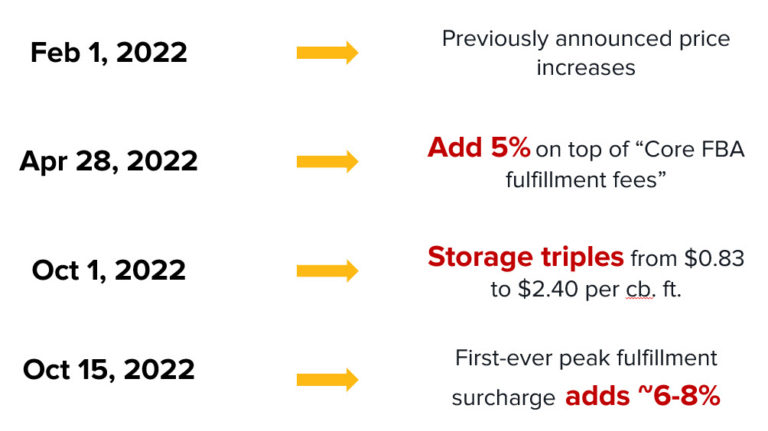
Source: Amazon Seller Central, Cahoot analysis
Annual Amazon FBA Fee Increase
Amazon’s 2026 U.S. FBA fulfillment fees will increase by an average of $0.08 per unit sold, or less than 0.5% of an average item’s selling price.
Effective March 1, 2026, removal and disposal fees will be charged on a per-unit basis at the time each unit is removed or disposed of.
It started with annual FBA fee increases that kicked in on February 1st. Order fulfillment fees increased from 2% on the low end to as much as 12% on the high end. Sellers with items in the Small Standard categories saw increases of 8%, or $0.22 to $0.27. For small products selling under $20 or even $10, this immediately shaved off a few points of margin.
On top of that, FBA Storage Fees increased by $0.08 per cubic foot, or 10.6%. Again, this increase can shave off a point or two of margin, making enduring profitability that much more difficult.
Finally, Amazon increased Removal and Disposal Fees by over 100% for many items. For instance, a SKU between 1-2 lbs will increase from $0.35 to $0.75. Sellers don’t usually plan on having to pay for removal, but nevertheless some products will fail to sell and need to be liquidated – especially in the cutthroat environment of Amazon’s 3P marketplace. This change raises the overall cost of doing fulfillment business.
Amazon Fuel and Inflation Surcharge
Just two months later, Amazon added a 5% “fuel and inflation surcharge” on top of the previously announced price increases. This kind of surcharge was a first for Amazon, and like the previous changes it adds another ~20 to 50 cents in cost to most items. Taken together with the Q1 increases, by this point FBA had already added a dollar or more to total fulfillment costs for many items.
Amazon Holiday Peak Order Fulfillment Fee
For 2025, Amazon will again apply holiday peak fulfillment fees from October 15, 2025 through January 14, 2026 for Fulfillment by Amazon (FBA), Remote fulfillment with FBA, Multi-Channel fulfillment (MCF), and Buy with Prime, and Amazon says these peak fees will be the same as last year.
The new fee in question, the Holiday Peak Order Fulfillment Fee, will be applied on top of both of the February price increases and the Fuel and Inflation Surcharge. It will be in effect from October 15th of this year to January 14th in 2023, so for the entirety of peak.
At an average of another 35 cents on top of the other increases, there are few, if any, items that haven’t shot up over a dollar in cost to fulfill through FBA this year. When you consider that many smaller items only cost $3 or $4 to fulfill through FBA, that’s a staggering 25%+ increase in one of the most important operational costs in one year. Sellers with small, $10 items have now likely seen over 10% more of their revenue disappear in FBA fees in just over half a year. That, unfortunately, is fatal to most sellers.
The Top Amazon FBA Alternative: Cahoot FBM
Cahoot has created an Amazon-like ecommerce order fulfillment services network that makes low cost, fast and free shipping a breeze for every eCommerce sales channel – including Amazon FBM.
Cahoot is the next generation of tech-enabled order fulfillment networks. Unlike other networks that are collections of third party logistics warehouses (3PLs), Cahoot’s innovative approach empowers merchants across the country to fulfill orders for one another. Our peer-to-peer network is a collective of highly vetted eCommerce retailers who offer up excess warehouse space and resources to provide high-quality order fulfillment to other merchants. Since they fulfill their own DTC orders, they know how important top-notch fulfillment is, and they put the same care and energy into your orders as they do for their own.
Because Cahoot is leveraging excess capacity in merchant-owned warehouses, we’re less pressured by rising warehouse and labor costs than Amazon is. As a result, costs are typically lower than what you get with a traditional 3PL fulfillment company. With a P2P network, multi-channel fulfillment with nationwide 1-day and 2-day delivery at economy shipping rates is the norm.
Still unconvinced? Here’s a deep dive into how you can make the choice between Amazon FBM vs FBA – or decide to use a mixed strategy.
Written By:
Jeremy Stewart
Jeremy Stewart leads customer success at Cahoot, helping merchants achieve high-performance logistics through smart technology and process optimization. With a background in both ecommerce operations and client services, Jeremy ensures that every merchant using Cahoot gets measurable results—whether they’re scaling from one warehouse to many or managing complex returns.
Turn Returns Into New Revenue
Related Articles
How Much Does Seller Fulfilled Prime Cost? Calculate It for Your SKU
Seller Fulfilled Prime sounds attractive until you start thinking about the bill.
Amazon AWD Size Limits Changed: What Bulky Sellers Must Do Before Q4 2026
Beginning July 31, 2026, Amazon AWD stopped accepting new sortable sellable units at or above 18x14x8 inches or 20 lb, so any unit that meets or exceeds those thresholds is no long...
Why Even a 4:30 PM Cutoff Cannot Solve Amazon’s 40% One-Day SFP Rule
An established ecommerce merchant shipping more than 20,000 monthly orders from Pennsylvania had already pushed its cutoff to 4:30 PM Eastern Time and was willing to use Next Day A...
Amazon Market Research: How Data-Driven Decisions Increase Online Profits

In this article
11 minutes
- Understanding the Amazon Marketplace
- Market Size and Growth
- The Foundation of Successful Amazon Selling
- The Benefits of Market Research
- Understanding Market Trends
- Product Research: Finding Profitable Products
- Analyzing Customer Feedback
- Product Selection and Sourcing
- Optimizing Product Listings
- Marketing and Promotion Strategies
- Minimizing Risks
- Conclusion
In the vast and competitive world of ecommerce, staying ahead of the game is essential for business success. Whether you’re a seasoned Amazon seller or just starting out, one of the most valuable strategies you can adopt is investing in thorough market and product research. This investment can significantly boost your online profits and help you make informed decisions about which products to sell and how to sell them. In this comprehensive guide, we will explore the importance of market and product research on Amazon and how effective Amazon product research strategies can maximize your return on investment (ROI).
Understanding the Amazon Marketplace
Amazon is the world’s largest online marketplace, offering an extensive range of products to consumers across the globe. This immense platform presents both opportunities and challenges for sellers. To succeed, you must first understand the dynamics of the Amazon marketplace:
- Competition: Amazon hosts millions of sellers, and each product category is highly competitive. Know your competition in order to carve out your niche effectively.
- Consumer Behavior: Amazon’s search algorithm, A9, determines product rankings based on various factors, including customer reviews, keywords, and sales history. Understanding how customers search for products can help you optimize your listings.
- Fulfillment Options: Amazon offers different fulfillment methods, such as Fulfilled by Amazon (FBA) and Fulfilled by Merchant (FBM). Each has its pros and cons, and your choice can impact your profit margins.
- Pricing Strategies: Dynamic pricing is common on Amazon, so keep an eye on your competitors’ pricing strategies and adjust yours accordingly.
- Reviews and Ratings: Positive reviews and high ratings can boost your product’s visibility and credibility, increasing sales.
Another valuable resource for Amazon sellers is the Amazon Product Opportunity Explorer tool so sellers can save opportunities and revisit historical trends without restarting research. In March 2026, Amazon added a dedicated Your Saved & Recent Views tab in Product Opportunity Explorer so sellers can save opportunities and revisit historical trends without restarting research. This tool helps identify new product ideas by allowing sellers to search for relevant niches and access key metrics like customer needs and search volume, which aid in making informed decisions and reducing the risk of product failure.
Market Size and Growth
Understanding Amazon’s market size and growth helps make informed decisions about your product offerings. Amazon’s net revenue has seen a consistent upward trajectory, reaching an impressive $638 billion in 2024. Projections suggest this figure will continue to rise 5 – 9% per quarter, driven by the ever-increasing demand for online shopping, the expansion of Amazon’s product range, and strategic acquisitions.
To gain valuable insights into Amazon’s market size and growth, sellers can leverage tools like SmartScout. This tool provides historical market share data, helping you understand the dynamics of the Amazon marketplace and identify potential growth opportunities. Additionally, analyzing Amazon’s revenue breakdown by product category can offer a more granular view of the market, enabling you to make informed decisions about your product offerings.
The Foundation of Successful Amazon Selling
Before delving into the specifics of market and product research, it’s helpful to understand why it’s the foundation of successful Amazon selling. Here are some key reasons:
Avoiding Costly Mistakes
Without proper research, you’re fundamentally operating in the dark. You may invest in products with little to no demand or are oversaturated with competition. These mistakes can result in significant financial losses. Market research helps you avoid these pitfalls by providing data-driven insights into what products will likely succeed.
Adaptation and Growth
Ecommerce is a dynamic space. Consumer preferences, market trends, and competitors’ strategies can change rapidly. By investing in research, you not only identify opportunities but also adapt to changing circumstances. This adaptability is fundamental to sustained growth in the long term.
Enhanced Decision Making
Data-driven decision-making is the hallmark of successful Amazon sellers. With the correct information at your fingertips, you can make informed choices about product selection, pricing strategies, and marketing efforts. This increases your chances of success and profitability.
The Benefits of Market Research
Amazon market research involves analyzing the Amazon marketplace as a whole to identify trends, opportunities, and gaps in the market. Here’s how investing in Amazon market research can help sellers:
- Identifying High-Demand Products: By analyzing search trends and historical data, you can identify products with high demand but limited competition. Tools can also help estimate sales to identify lucrative opportunities in these niches.
- Evaluating Competition: Market research helps you assess the strength of your competition. You can identify weaknesses in their offerings and develop strategies to outperform them.
- Pricing Insights: Analyzing price trends can help you set competitive and profitable product prices.
- Understanding Customer Needs: By examining customer reviews and feedback, you can gain insights into what customers like and dislike about existing products in your chosen niche.
- Seasonal Trends: Market research allows you to identify seasonal trends and adjust your product offerings accordingly.
Understanding Market Trends
Understanding current market trends is one of the first steps in effective Amazon market research. Market trends encompass consumer preferences, product demand, and industry shifts. Analyzing sales trends helps identify market dynamics and emerging opportunities. Here’s how to harness this knowledge:
Track Seasonal Variations
Many products experience seasonal fluctuations in demand. You can optimize your product listings and marketing efforts by tracking these patterns. For example, if you’re selling holiday-themed items, you’ll want to prepare well in advance to capture peak seasonal demand.
Analyze Historical Data
Historical sales data is a goldmine for understanding market trends. It can reveal long-term patterns and help you forecast future demand. Analyzing this data can guide your inventory management and product selection strategies.
Competitor Analysis
Competitor analysis is another critical aspect of Amazon market research. Understanding your competitors can give you a competitive edge. Here’s how to go about it:
Monitor Sales Volumes: Keeping an eye on your competitors’ sales volumes can provide valuable insights into market demand. It’s also important to understand their gross sales to formulate better strategies based on their monthly revenue, average daily orders, and unit prices. This information can help you identify trends and adjust your approach accordingly.
Identify Key Competitors
Start by identifying your main competitors in your niche. Look for sellers with similar products and target demographics. Tools can provide a comprehensive list of competitors.
Analyze Pricing Strategies
Study your competitors’ pricing strategies. Are they pricing lower to capture market share, or do they maintain premium pricing? Understanding their pricing approach can help you position your products effectively.
Monitor Sales Volumes
Knowing how well your competitors are performing can inform your own strategies. If a competitor is consistently outselling you, it’s worth investigating their marketing tactics, product listings, and customer reviews.
Product Research: Finding Profitable Products
While understanding market trends and analyzing competitors are valuable components of Amazon’s success, product research is equally important. Utilizing a product research tool can assist in finding profitable products by analyzing competition and tracking market trends. Here’s how to identify profitable products:
Niche Selection
Start by selecting a niche that aligns with your expertise and interests. Look for niches with a balance between demand and competition. Avoid overly saturated markets where it’s challenging to stand out.
Identify High-Demand Products
Use tools like Algopix to identify high-demand products with the potential for consistent sales. These tools can also help generate a list of potential product ideas tailored to specific business criteria. Look for products that are evergreen and not subject to seasonal fluctuations.
Evaluate Profit Margins
Calculate potential profit margins by considering the cost of goods, Amazon fees, and shipping costs. Ensure that your chosen products offer a healthy profit margin to sustain your business.
Check for Trends and Seasonality
Examine whether your chosen products have consistent demand throughout the year or if they are subject to seasonal trends. Seasonal products can be profitable but require careful planning.
Analyzing Customer Feedback
As of August 4, 2025, Amazon lets customers submit seller feedback as a star-only rating with optional written feedback, so sellers may receive more ratings with less context. Customer feedback is a goldmine of information that can significantly enhance your product research efforts. By delving into customer reviews and ratings, you can gain valuable insights into customer satisfaction and pinpoint areas for improvement. This deeper understanding of your target audience can help you develop marketing strategies that resonate with their needs.
Tools like AMZScout are invaluable for analyzing customer feedback. They provide a comprehensive analysis of reviews and ratings, allowing you to identify trends and patterns. This data can guide you in refining your products and improving customer satisfaction. Additionally, engaging with customers on social media and online forums can provide further insights into their preferences and needs, helping you tailor your offerings more effectively.
Product Selection and Sourcing
Selecting and sourcing the right products is a cornerstone of successful Amazon selling. To identify profitable products that meet customer demand and can be sourced at competitive prices, you need to conduct thorough product research. Tools like Jungle Scout can be instrumental in this process, offering a comprehensive analysis of product trends and sales data.
When selecting products, consider factors such as demand, competition, and pricing. Ensure that the products you choose comply with Amazon’s policies and guidelines. Building relationships with reliable suppliers who can provide high-quality products at competitive prices is also crucial. This approach not only helps in maintaining product quality but also in securing better profit margins.
Supplier Relations and Logistics
Building strong relationships with suppliers is the first step for sourcing high-quality products at competitive prices. Clear and professional communication with suppliers ensures they understand your needs and expectations. Additionally, developing a robust logistics and shipping strategy is necessary for timely delivery to customers.
Tools like ShipStation can streamline your logistics and shipping processes. This platform helps manage orders and shipping efficiently, ensuring that customers receive their products on time. By optimizing your logistics, you can enhance customer satisfaction and maintain a competitive edge in the market.
Optimizing Product Listings
As of January 21, 2025, Amazon’s product title requirements allow no more than 200 characters for most categories and also prohibit certain special characters and repeated words. Optimizing your product listings is a continuous process that involves keyword research and customer-focused content. Here’s how it can impact your profitability:
Keyword Research
Identify high-performing keywords for your products. Understanding search volume helps gauge product demand and trends, assess seasonality, and identify profitable keywords for optimizing product listings. Incorporate these keywords naturally into your product titles, descriptions, and backend search terms. Effective keyword research and optimization can improve your product’s visibility in Amazon’s search results.
Compelling Product Descriptions
Write compelling product descriptions that highlight the benefits and features of your products. Use high-quality images and ensure that your listing is complete and informative. A well-optimized listing can lead to higher conversion rates.
User-generated Content
Encourage customers to leave reviews and answer questions on your product listings. Positive reviews and helpful answers can build trust and boost sales. Respond to customer inquiries promptly to provide excellent customer service.
Marketing and Promotion Strategies
Effective marketing and promotion strategies are critical for driving traffic to your product listings and increasing sales. To develop these strategies, consider factors such as customer demographics, product trends, and competitor analysis. Tools like Helium 10 provide a comprehensive analysis of marketing and promotion strategies, helping you craft effective campaigns.
Ensure that your marketing and promotional strategies comply with Amazon’s policies and guidelines. Leveraging social media and influencer partnerships can also boost your product’s visibility and brand awareness. By developing a well-rounded marketing strategy, you can attract more customers and increase your sales volume.
Social Media and Influencer Partnerships
Social media and influencer partnerships are powerful tools for Amazon sellers. Partnering with influencers in your niche can enhance brand awareness and credibility. Platforms like Facebook and Instagram are excellent for promoting products and driving traffic to your listings.
To maximize the benefits of social media and influencer partnerships, develop a comprehensive social media strategy that includes content creation, engagement, and advertising. Ensure that your social media presence aligns with your brand identity and messaging. Tools like Hootsuite can help manage your social media presence and engagement, making it easier to connect with your audience and promote your products effectively.
Minimizing Risks
Investing in market and product research isn’t just about increasing profits; it’s also about minimizing risks. Here are some strategies to reduce potential losses:
Diversify Your Product Portfolio
Avoid putting all your eggs in one basket. Diversify your product portfolio to spread risk. If one product experiences a downturn, others can help balance your overall profitability.
Monitor Your Inventory
Overstocking or understocking can lead to financial losses. Regularly monitor your inventory levels and adjust your orders accordingly. Consider using Amazon’s Fulfillment by Amazon (FBA) program to streamline your inventory management.
Stay Informed and Agile
Keep a pulse on industry news, changes in Amazon’s policies, and emerging trends. Be prepared to pivot your strategies when necessary. Staying informed allows you to make proactive decisions.
Conclusion
In the competitive world of Amazon ecommerce, success isn’t guaranteed, but it’s attainable with the right strategies. Investing in market and product research is a smart move that can significantly increase your online profits. By understanding the Amazon marketplace, identifying high-demand products, and thoroughly researching potential offerings, you’ll be better equipped to make informed decisions, optimize your listings, and ultimately grow your ecommerce business. Remember that continuous research and adaptation are key to staying competitive in the ever-evolving world of online retail.
Written By:

Or Hillel, Algopix
Turn Returns Into New Revenue
Related Blog Posts
Is Amazon Responsible for the Sales by Third-Party Sellers?
Technology platforms govern consumer experience in a huge way. Users simply come to the platform, search for what they want, and start using it. Behind this consumer behavior, is the implicit trust in the platform that its users will act in the best interest of other customers. Apple’s App Store, Amazon’s Marketplace and Mastercard’s payment services are some examples.
Technology platforms govern consumer experience in a huge way. Users simply come to the platform, search for what they want, and start using it. Behind this consumer behavior, is the implicit trust in the platform that its users will act in the best interest of other customers. Apple’s App Store, Amazon’s Marketplace and Mastercard’s payment services are some examples.
Apple vs. Amazon on governing its customers
Apple has been very careful about who it allows to operate on its platform and regularly weeds out apps which might exploit its users, such as the recent case of a few dating apps. They were removed from Apple’s App Store because they allowed children as young as 12 to access them.
On the other end of the spectrum is Amazon. Amazon has aggressively expanded its third-party seller base. Now it accounts for about half the revenue generated by the e-commerce division of Amazon.
But in the process, they have been accused of being lax about the quality of merchants they have allowed on the platform. This has enabled counterfeits and sometimes, dangerous items to be sold on the biggest online marketplace in the US.
3rd party seller avoiding responsibility for defective goods
Recently, a federal court has ruled that Amazon can be held liable for defective goods sold on its site by third-party sellers. This has come after a long battle where earlier a lower court had ruled in Amazon’s favor.
CNBC reported, “The decision on Wednesday related to a case in which a Pennsylvania customer, Heather Oberdorf, purchased a retractable dog leash on Amazon.com from a third-party vendor, The Furry Gang. While walking her dog in 2015, Bernardo was blinded after the leash suddenly recoiled. Neither Oberdorf nor Amazon have been able to contact The Furry Gang.”
How will Amazon deal with the backlash?
So why is Amazon being held responsible? The central point is the customer’s trust in Amazon. Amazon only allows customers to contact the seller through Amazon. This means that the merchants can conceal themselves from the customer, putting the onus squarely on Amazon in case of malfeasance.
There are a couple of paths Amazon can take from here. One, it can increase the scrutiny for the quality of merchants, making it harder to sell on Amazon. On the other hand, it can allow direct access for customers to merchants, losing control of customer experience. Given Amazon’s obsession with customers, we can only expect an innovative solution just around the corner.
Written By:
Indy Pereira
Indy Pereira helps ecommerce brands optimize their shipping and fulfillment with Cahoot’s technology. With a background in both sales and people operations, she bridges customer needs with strategic solutions that drive growth. Indy works closely with merchants every day and brings real-world insight into what makes logistics efficient and scalable.
Turn Returns Into New Revenue
Related Blog Posts
How Amazon Buy with Prime Impacts the DTC Customer Experience

In this article
13 minutes
- What is Buy with Prime?
- How Buy with Prime Shifts the Ecommerce Landscape
- How Buy with Prime Interrupts Your Customer Experience
- How BWP Affects Discovery
- How BWP Affects Conversion
- How BWP Affects Post-Purchase and Brand Loyalty
- How BWP Affects Repeat Purchases
- Alternatives to Amazon Buy with Prime
Shopify and Amazon have teamed up to offer Prime delivery to Shopify DTC ecommerce shoppers called Buy with Prime. Third-party ecommerce merchants that sign up for the service will install the Prime badge in their checkout process, connect Amazon Pay as a Wallet within Shopify Payments for customers to checkout with Amazon Pay, and leverage Amazon’s huge distribution network to fulfill orders on their own sites through the Multi-Channel Fulfillment (MCF) outsourced logistics service. This allows merchants to tap into the preferences of Amazon Prime members, such as fast shipping and a seamless shopping experience. Additionally, Shopify merchants can benefit from integrating Buy with Prime into their stores, enabling them to offer fast shipping and easy checkout, while streamlining operations through Amazon’s logistics network. It’s effectively Amazon payment and fulfillment for ecommerce brands.
The potential benefits for a DTC Seller are obvious: they’ll be able to offer their customers one-and-two-day delivery, and Prime users will have their checkout information pre-loaded on the site via their Amazon Wallet. This is no small win. According to McKinsey & Company, more than 90% of US online shoppers expect free two-day shipping, while many Sellers lack a distributed warehouse network that make fast and free shipping affordable.
Some drawbacks are obvious – you’ll have to put Amazon branding all over your checkout and post-purchase experience, for instance. Many others are harder to spot, though, and they affect the entire customer experience that you’ve worked so hard to create.
In this blog, we’ll walk you through the basics of what Buy with Prime (BWP) is, how it affects the ecommerce industry, and how it negatively affects your customer’s experience. Finally, we’ll share our perspective on how you can get the key benefit of Buy with Prime (fast and free shipping) without surrendering your brand to Amazon.
What is Buy with Prime?
Amazon Buy with Prime gives DTC Sellers the ability to offer their customers the Amazon Prime checkout and delivery experiences on their Shopify site. When a Seller integrates with the service, they’ll get:
- The Prime logo and expected delivery date in their checkout process
- Amazon Pay-enabled checkout
- Checkout will pre-load customer information if they’re already Prime members
- Fulfillment from Amazon FBA which operates Amazon’s FBA fulfillment network
- Shipping by Amazon Logistics (or partnered carriers)
- Option to adopt Amazon Prime’s returns policy
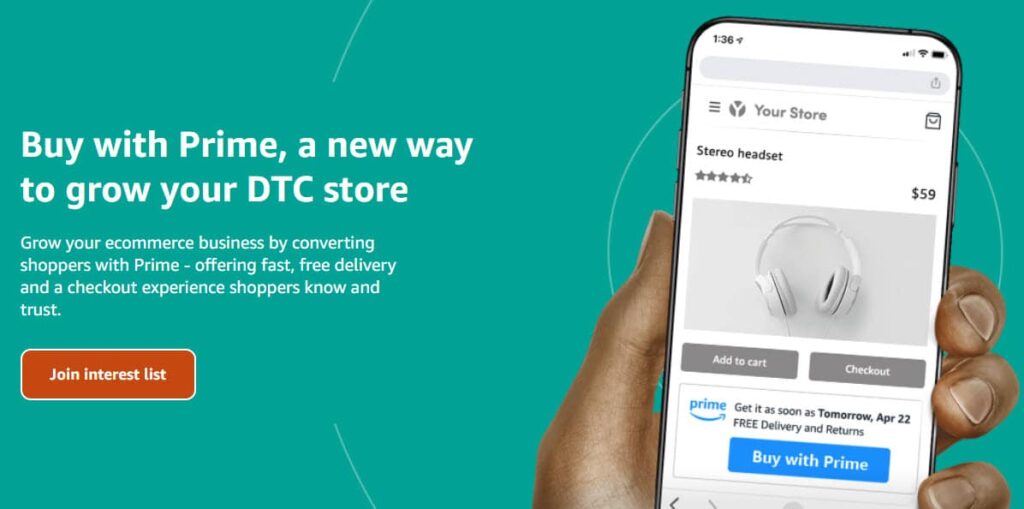
As we mentioned above, the benefit is obvious: Amazon Prime is the gold standard for speedy online delivery, and you’ll get it on your site. Prime has consistently raised customer expectations for fast and free delivery over its history, to the point where slow shipping and paid shipping are two of the biggest drivers of cart abandonment.
If you don’t currently offer fast and free shipping, Buy with Prime will immediately fix that issue for you. Amazon currently reports that merchants using Buy with Prime experienced, on average, (a 16% increase in revenue per visitor in A/B testing, which Amazon attributes to the combination of trusted checkout and fast delivery. Additionally, integrating two powerful ecommerce tools like Amazon Multi-Channel Fulfillment and Buy with Prime simplifies the management of product catalogs, orders, and returns for online retailers while leveraging Amazon’s Fulfillment Network.
How Buy with Prime Shifts the Ecommerce Landscape
Buy with Prime will leave DTC Sellers with little choice but to improve their delivery experience to meet the standards long set by the marketplaces.
Online brands have long maintained that their curated shopping experiences, community building, and custom unboxing experiences counterbalance the raw power of fast and free delivery from marketplaces. A look at ecommerce transaction value in the United States suggests otherwise, though, as combined US marketplace GMV growth exceeds US DTC GMV growth.
US consumers spend nearly four times as much on Amazon, Walmart, and Target’s ecommerce sites than they do on all DTC ecommerce sites combined. And on top of that, the marketplaces are growing faster. We attribute a huge part of the marketplaces’ advantage to the fast and free shipping that they offer by default on most goods. After all, online consumers cite fast and free shipping as a baseline expectation in survey after survey.
Buy with Prime will ratchet up US consumer expectations for fast and free shipping even further. Now, DTC Sellers aren’t just putting their superior brand and shopping experience up against the convenience of the marketplaces. They also have to fight against competing DTC Sellers that sign up for Buy with Prime and thus combine the power of their brand with Amazon’s famed fulfillment network.
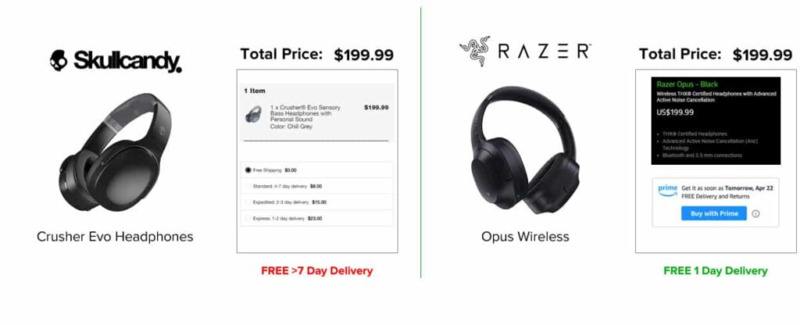
Imagine if YOUR top competitor installs Buy with Prime on their site and blows your delivery speed out of the water. Online consumers love comparison shopping, and you’ll be at a severe disadvantage on your Product Display Page (PDP) and in checkout. You can expect your cart abandonment rate to skyrocket. In short, your slow delivery experience will become an even bigger liability than it already is. Integrating Buy with Prime into Shopify stores can provide a competitive edge by enhancing delivery speed and efficiency, making it important for Shopify merchants to consider this feature. Additionally, by offering Prime benefits, you can boost shopper confidence. Prime members love the reliability and speed of Amazon’s delivery service, and by extending these benefits to your own site, you can encourage more sales and reduce cart abandonment rates.
Likewise, DTC brands can benefit from streamlined fulfillment, offloading the logistics to FBA and potentially enjoying reduced fulfillment costs (more on this later; it may not be as simple as it sounds).
How Buy with Prime Interrupts Your Customer Experience
So, the answer must be simple, right? Just sign up for Buy with Prime and drive more sales.
If only it were that easy.
Unfortunately, Amazon Buy with Prime is a much better deal for Amazon than it is for DTC Sellers, and it’s all in the way BWP will impact your customer experience and ability to retain loyal buyers.
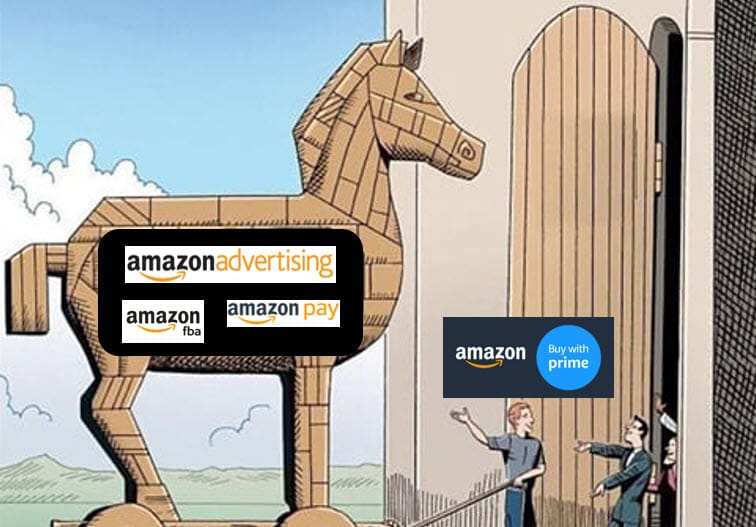
To Amazon, Buy with Prime is about much more than extending its fulfillment operations, Amazon FBA, to DTC Sellers. In fact, they care much more about their ability to get your browsing and purchasing data and use it to their advantage. With BWP, a Seller has to use Amazon Pay for transactions. That means that Amazon will get all of your customer data, and not to mention they’ll bank tons of transaction fees.
While Amazon is laughing its way to the bank, it will be interrupting your customer experience at every step of the journey.
How BWP Affects Discovery
We’ll start at the beginning of the customer journey: product discovery. Here, DTC stores are already at a severe disadvantage: a majority of US shoppers say that they start their online product searches on Amazon.
It’s already an uphill battle trying to get customers to your website. If you install Amazon Buy with Prime, you’ll give Amazon even more ammunition to prevent shoppers from ever making it to you.
It’s simple: if you give Amazon rich data on what your customers are purchasing, they’ll know exactly what to suggest to the customer the next time they stop by Amazon. Since by definition these shoppers are Prime customers, it’s a sure bet that they’ll do so. And when they visit, they’ll see product recommendations perfectly targeted to them, thanks to the additional information that you gave Amazon through Buy with Prime.
Fewer customers will make it to your site organically because more of them find what they’re looking for on Prime without ever turning to a search engine. You’ll have to react by spending more on digital advertising, raising your ACOS, and hurting your margin.
How BWP Affects Conversion
With prominent placement on the Product Details and checkout pages, Amazon Buy with Prime most obviously affects conversion.
While the Prime button promising fast and free shipping from Amazon should help lower cart abandonment rates from shoppers who want fast shipping, it raises a whole host of other issues that counteract the benefits.
First, and perhaps most obviously, Buy with Prime will repeatedly remind shoppers that they should check Amazon before completing a purchase on a DTC website. Price checking is already a core part of many shoppers’ online purchasing behavior, and the Prime logo will only serve to further solidify this trend.
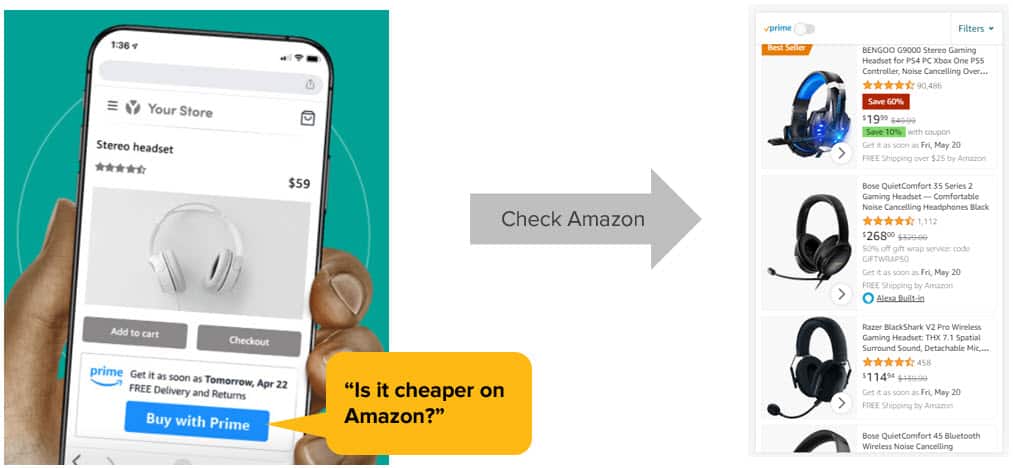
When the price check occurs, the DTC brand can only lose. The customer may see that Amazon has the same item for less (a common occurrence because Amazon strictly enforces their “lowest price” rule), and they’ll also see a host of competitive offers. Taken together, the increased risk of losing a customer to Amazon counteracts the benefit of fast and free shipping.
On top of that challenge, Buy with Prime also removes a key DTC Seller tool to boost AOV. Many Sellers use free shipping as a carrot to induce customers to sign up for loyalty programs or to increase their cart size. “Free shipping for orders over $49” is a tried and true tool to increase profit, but by using Buy with Prime, it goes out the window. Larger order sizes and customer loyalty programs are key pillars in DTC profitability, because each maximizes profit dollars relative to overhead and marketing spend. Amazon will interrupt your ability to use these tools, and instead it replaces your tools with its own loyalty program – Prime.
Finally, Buy with Prime will hurt conversion because it will likely increase cart abandonment rate. According to BigCommerce, the average cart abandonment rate is nearly 70%, and that number rises to a whopping 86% for mobile shoppers. Most DTC Sellers know the truth behind that large number – many shoppers use online carts as a “save for later” feature, and they come back to complete their purchase at a later date. Buy with Prime will interrupt that process and steal customers that are carefully considering a purchase.
How BWP Affects Post-Purchase and Brand Loyalty
Buy with Prime is supported by the FBA network, but Sellers expecting FBA’s low rates will likely be disappointed. Amazon already lets Sellers use FBA for their DTC orders through its non-Amazon solution, Amazon Multi-Channel Fulfillment, but the fulfillment pricing is shockingly bad.
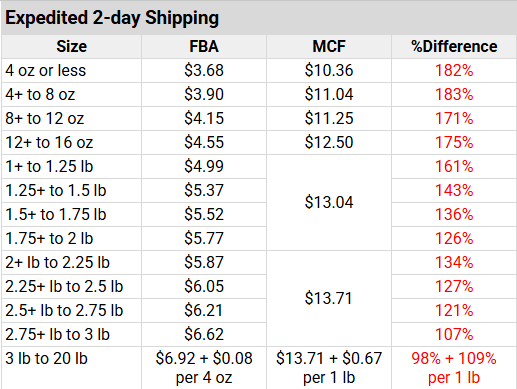
Cahoot’s analysis of 2025 FBA rates versus MCF rates reveals that MCF is at least 50% more expensive than FBA, and reaches nearly 3X the cost for the small standard size category (which are the items FBA loves to ship!). Sellers that have done the math to consider Amazon FBA vs FBM already know that FBA is a bad deal for items larger than a few pounds, and this comparison rate table suggests that Buy with Prime will be an even worse deal.
On top of that, you will lose the ability to control the unboxing experience. No more free marketing from unboxing videos, no more custom inserts to boost repeat rate, and no more amazing first impressions: Amazon now owns your post-purchase experience. Yes, the experience is improving in terms of delivery speed, but it’s degrading in every other way (we all know how FBA loves to put small items in oversized boxes with a ton of air pillows that customers hate to pop and send to the landfill). And to add insult to injury, you’re now marketing for Amazon by using their Buy with Prime logo on your checkout pages.
How BWP Affects Repeat Purchases
Last but certainly not least, Amazon Buy with Prime will also interrupt your ability to build brand loyalty, win repeat purchases from your customers, and increase lifetime value by carefully cultivating a long-term relationship – the linchpin of sustainable profitability.
Amazon’s current materials emphasize that Prime members value fast, free delivery and that Buy with Prime is designed to extend those benefits to merchants’ own ecommerce sites. Sellers are up against some daunting statistics – according to a 2024 Marketing Scoop survey, Prime members spend an average of $1400 per year on Amazon, (nearly twice as much as non-Prime customers). And half of Prime members buy something on Amazon at least once a week, and 75% shop on Amazon 3-4 times per month.
And now, every time they visit Amazon, they’ll see recommendations to buy your products right then and there instead of going back to your website.
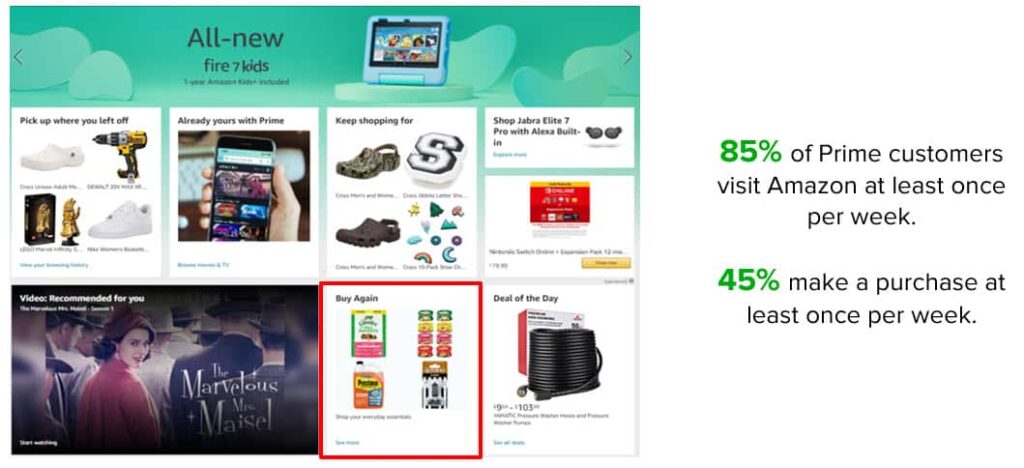
Amazon can and will use the data it gains from its Buy with Prime plugin on your site to sell to your customers with pinpoint precision. With Prime users visiting Amazon.com just about every week, they’ll quickly start buying your product (or a competitor’s) on Amazon instead of your site.
Amazon is touting Buy with Prime as a way that you can tap into Prime’s huge customer base.
In reality, it’s Amazon’s way to tap into your customer base.
Setting up Buy with Prime on your Shopify store is a straightforward process that can be completed in a few simple steps that start with installing the app. Search for the Amazon MCF and Buy with Prime app in the Shopify App Store. Once you find it, click on the install button to add it to your Shopify store. There are a few minor configurations, but again, very straightforward.
Alternatives to Amazon Buy with Prime
DTC Sellers must feel like they’re stuck between a rock and a hard place. On one hand, they’re squeezed by demanding customer expectations for fast and free shipping, while on the other, they’re faced with the incredible expense of providing fast and free shipping. Now, Amazon promises to help with the latter challenge, but it’s a poison pill that invades their customer experience.
Thankfully, there’s a better way.
Amazon can provide fast and free shipping affordably across the country thanks to its ability to distribute inventory to multiple locations and tightly control fulfillment with intelligent, automated rules. Ten years ago, they were at the forefront of this revolution in fulfillment, but now they’re far from the only ones that can affordably power fast and free shipping.
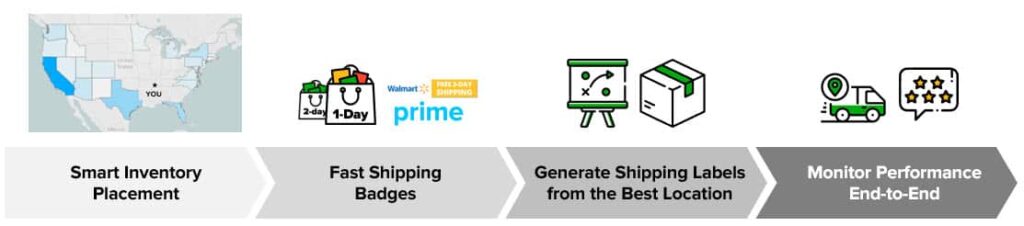
cahoot is at the forefront of boosting profitable growth for online Sellers by enabling fast and free shipping across all channels. Unlike Amazon Buy with Prime, Cahoot fulfillment operates in the background, leaving you to own your customer experience – but with new and improved fast delivery. And again, unlike Amazon Buy with Prime, it works for all sales channels: Buy with Prime certainly won’t be available for Walmart and other major marketplaces. You’re limited to Shopify, a plug-in to be used on another ecommerce platform, or custom integration.
And more than Amazon, (and other distributed 3PL networks), Cahoot offers unparalleled flexibility in fulfillment to support the exact needs of DTC Sellers. We offer efficient B2B fulfillment alongside our fast B2C fulfillment, and we also can integrate seamlessly with existing merchant-operated warehouses (or extend your existing 3PL with more locations!). If you have one warehouse on the East Coast, and shipping across the country is killing your margin, we can stand up a West Coast location for you and install our market-leading technology to intelligently govern your new, nationwide fulfillment network. Of course, if you need a full-service solution, that’s what we do.
Contact us to speak with a fulfillment expert and learn how we can boost your growth while cutting costs and headaches today.
Written By:
Jeremy Stewart
Jeremy Stewart leads customer success at Cahoot, helping merchants achieve high-performance logistics through smart technology and process optimization. With a background in both ecommerce operations and client services, Jeremy ensures that every merchant using Cahoot gets measurable results—whether they’re scaling from one warehouse to many or managing complex returns.
Turn Returns Into New Revenue
Related Blog Posts
Seasonal Keywords to Optimize Your Amazon Product Listings
Hola, Amazon Sellers! We’ve got some news for you. It is predicted that the 2021 holiday season is going to witness eCommerce sales of $206.88 billion with a rise of 11.3% in the US.
With the holiday season knocking at our doors, Amazon sellers are putting their best foot forward in optimizing their listings for grand traffic, massive sales, and greater profits.
If you want to reap the benefits of this holiday shopping season, then there is no better time than this! But how can you stand out in such a fiercely competitive environment?
For Amazon sellers, a winning holiday keyword strategy is one of the best ways to improve their listings’ discoverability. By investing early in seasonal keyword optimization, you can acquire high positions in SERPs ahead of the competition and increase traffic and sales exponentially.
So, are you ready for the revolutionary 2021 Amazon holiday shopping sales? Let’s make the seasonal keyword optimization magic happen with some powerful seller moves. But before we unveil some of the best Amazon keyword practices, let’s understand the fundamentals of Amazon SEO and how it works.
What is Amazon SEO?
The first page of Amazon’s SERP is one of the most coveted pieces for every seller. It has the power to convert one-time page visitors to buyers and bring about a stunning increase in overall profits.
Like Google, Amazon analyzes the search results through its algorithm, which again includes several factors like –
- Product Title with high-converting keywords
- Product Description with relevant keywords
- Product Features with clear bullet points
- Appealing Product Images
- Good Ratings and Reviews
- Competitive Product Price
The underlying search engine is known as A9. The algorithm deploys several parameters to engineer the relevancy of millions of listings stored in its database with the search terms used by the shoppers.
Behind closed doors, Amazon’s search engine algorithm – A9 is constantly being renewed and refined. Although no one really knows its formula or how exactly it works, there are some widely known factors that influence it.
What is A9?
A9 is Amazon’s product ranking algorithm which provides the results depending on the terms or keywords or queries added by users in Amazon’s search box. The results displayed are catalyzed by the shopper’s preferences, past orders, and keyword matches.
How does A9 work?
The A9 algorithm selects the product listings to be displayed to potential buyers and their rankings based on some criteria like:
- Relevant keywords added in listings that match with customer search queries
- Previous customer preferences and behavior
- Customers’ past purchases
While customer preferences and their past purchases aren’t in your hands, what you can influence is your product’s organic ranking by optimizing your listings and making them SEO-friendly.
Why Should You Optimize Amazon Keywords for This Holiday Season?
The goal of Amazon’s search engine is to provide customers with the most relevant product results in relation to the search queries they insert. When it comes to product listings, Amazon looks at keywords present in various fields of the listing like title, description, and bullet points. To display products for every time they are searched, Amazon “indexes” these keywords in its database, i.e., collecting, parsing, and storing the search terms.
Therefore, a crucial portion of your Amazon marketing strategy is to ensure that your listings have an optimized Amazon product title, descriptions, and bullet points with high-converting and relevant keywords. This is even more significant to the holiday season as it brings about an exponential increase in traffic as compared to other times.
Your listing should be optimized in a way that A9 can locate it, and it should also be compelling for customers to pay enough attention to your products and brand.
It is recommended that during the holiday season, holiday-based search terms like “gift pop-up cards”, “Christmas gifts”, etc. should be added to your listing content.
Note: When you craft your listing content, make sure it flows naturally. Avoid keyword stuffing, as this diminishes the credibility of your product listing, and drives away potential buyers from your product page to your competitors’ pages.
Tips on Optimizing your Amazon Product Listing with Seasonal Keywords
Here are a few tips and tricks that will help you tackle Amazon’s A9 ranking factors and make your listings holiday season ready in no time:
Step 1: Perform Relevant Keyword Research
Before you begin with keyword research, you should pause and set your goals for your products and brand and why would you want to leverage keywords for your listings.
Do you wish to improve your listing’s search rankings? Are you launching a new product this holiday season? Are you trying to compete with existing sellers selling seasonal products?
Once you define your goals, your keyword research task gets way easier than it actually is.
Generally, you want to add those keywords to your listings that are more specific and searched for the most by shoppers. For instance, listing Christmas bells as “bells” in your product title will likely have a negative impact on where your product appears in the SERPs as it will attract a lot of irrelevant traffic who aren’t even searching for Christmas bells.
Since long-tail search terms are considered more effective, you must incorporate long-tail keywords into your product listings to optimize for Amazon’s SERPs.
Another efficient strategy is to implement the next-to-highest ranking Amazon keywords for your listings. Small-scale third-party Amazon sellers launching new holiday/seasonal products can face overwhelming competition for the top keywords.
In such cases, optimizing a listing for the keyword “Christmas bell” and expecting to land at the top of Amazon’s SERP is not favorable. Therefore, it’s a good idea to opt for a more specific long-tail keyword like “Christmas Tree Decoration Bells”.
Top Seasonal Keywords
Here is a list of the best seasonal keywords collected by us that you may use for your product listing content:
- Gifts for Men
- Gifts for Women
- Christmas Decorations
- Christmas Socks
- Kids Halloween gifts
- Jazz Christmas
- Halloween Gifts Adults
- Thanksgiving Candies
- Cyber Monday Deals
- Toys Black Friday Deals
- Christmas Gifts
- Classical Christmas
How to Perform Keyword Research?
There are several third-party Amazon seller tools for performing keyword research that uses AI and ML technology to provide the most accurate data.
One such tool is SellerApp’s keyword research tool that analyzes thousands of data points to offer high-converting keywords for every seller type. The following are the SellerApp features that analyze keywords in a more innovative way –
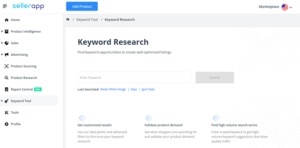
- Product Keyword: Get the best keywords, their relevance score, monthly search volumes and cost-per-click, to increase your listing desirability and discoverability.
- Reverse ASIN lookup: Compare your product to the competition and learn from their keyword strategies. Search any ASIN and see which keywords are ranking for that listing.
- Index checker: Check if your backend search terms entered in Seller Central are indexed or not. Optimize your product discoverability as per Amazon’s best practices.
- Keyword Tracker: View real-time keyword ranking position, change in their position, indexed products, and data-driven recommendations to improve Amazon listing SEO.
- Keyword Booster: This tool will show you all the optimal keywords for your product. Here, you can find and sort keywords based on their frequency. Copy and paste your keyword list into the Keyword Booster. Filter your keyword results by the variety of duplication filters, remove unwanted words and characters. Copy the cleaned keyword list from the Keyword Booster with the copy button and paste the optimized keyword list on your Amazon product info page.
Step 2: Make Your Product Title SEO-Friendly
Product Title is one of the most crucial factors that have the power to exponentially boost your product’s visibility and rankings. Make sure that you add all the relevant information in your title and craft a catchy product title.
According to Amazon, a product title should include the following:
- Brand
- Product
- Material
- Quantity
- Color
Note: A product title in the Amazon search is limited to 100 characters only. Therefore, use the space in a rightful manner – do not overstuff it with keywords, keep it appealing and simple.
Amazon has provided guidelines on how to craft good product titles. Your product title should include product information such as brand, product line, color, size, material or key feature, and packaging or quantity. Here, you must also include 1-2 relevant keywords that can influence product conversion and click-through rates.
If you are selling seasonal products, make sure to include holiday special keywords in your product title to get more visibility.
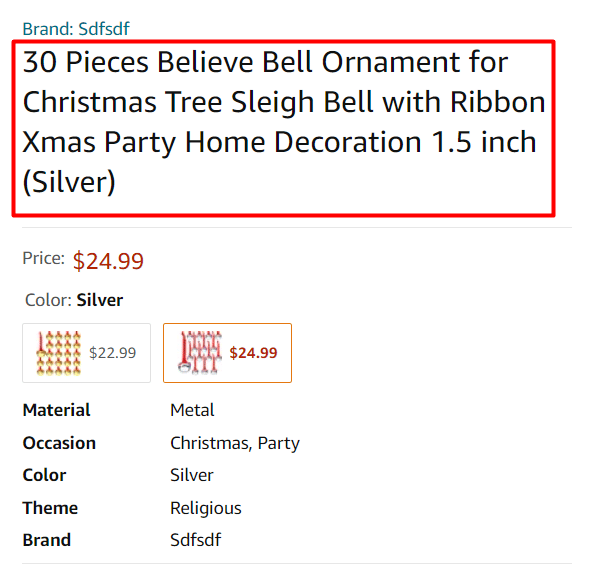
Ensure that the initial 5-6 words of the title are clear, crisp, and intelligible. These simple techniques make the title eye-catching as well as optimize it for the Amazon search.
Step 3: Optimize the Bullet Points
Amazon provides slots for adding bullet points that explain your products in a clear and concise manner to shoppers. Bullet points are found under any parent/child ASINs on the listing page.
They are usually paid more attention than the actual product description. Therefore, you should leverage this space to explain all the compelling features and benefits your product has.
In this section, add secondary keywords that are important but may not fit in the title, for example, keywords that are seasonal and resonate with the upcoming holiday/festivities. There is no need to repeat keywords from the title or other sections.

Simply use high-converting keywords throughout your product listings that you have gathered from your keyword research.
It is estimated that Amazon will index the first 1,000 bytes for your bullet points. Therefore, you must make sure that your bullet points should be 200 bytes max for them to be indexed.
Step 4: Craft a Product Description that Converts
Amazon’s A9 algorithm will prioritize those listings that have the power to convert and have made a considerable amount of sales in the past. Therefore, your product description should be crafted in a way that adds value to your listing and unveils its lucrative benefits, rather than just being informational.
Add in only the most relevant keywords that pertain to your product’s unique features, its type and texture, and overall utility.
The product description is also an ideal way to portray your brand and its vision, attract the target audience, and focus on the problem-solution framework. The character length of your description should be 2,000 characters, including spaces. Remember to make it short and crisp and not a huge chunk of complex texts.
Step 5: Do Not Forget the Backend Keywords
Amazon also offers sellers the opportunity to add hidden search terms, which are called “backend keywords.”
Although not visible, these keywords constitute the backbone of your listing’s rankings on Amazon SERP.
You can get up to 249 bytes for adding other very relevant keywords for your product that weren’t fit to be added into your listing content visible to customers like title, description, and bullet points. The best part about this section is that here, you can include –
- other high-ranking long-tail keywords,
- holiday-related keywords like “gift ideas”, “gift pop up cards”,
- misspellings that are searched the most by customers,
- synonyms that shoppers might look for,
- translation words of your products in Spanish or French or any other language.
Here, you don’t need to add product identifiers, like your brand or product name, or content that is irrelevant or repetitive.
Final Thoughts
If you stay proactive and prepare well for the 2021 holiday season, nobody can cease your progress. For even the most advanced Amazon sellers, optimizing keywords takes immense effort, time, and analyzing capabilities. Even though it all seems too overwhelming in the beginning, it can be streamlined with the right AI-powered Amazon keyword tool.
The truth is the more you can streamline the seasonal touch points across your Amazon business, the easier it will be to attract relevant traffic and scale-up.
We hope that this step-by-step guide benefits your Amazon business and fuels your seller journey to success. If you have any more questions, get in touch with us!

Author Bio – Arishekar N
Arishekar N, Director of Marketing & Growth at SellerApp, is a specialist in digital marketing, in addition to website keyword optimization for search engines. His areas of expertise include enhancing the organic & paid ranking of webpages on search engines with innovative SEO & SEM strategies and online promotions.
LinkedIn: https://www.linkedin.com/in/arishekar/
Turn Returns Into New Revenue
Related Articles
How Much Does Seller Fulfilled Prime Cost? Calculate It for Your SKU
Seller Fulfilled Prime sounds attractive until you start thinking about the bill.
Amazon AWD Size Limits Changed: What Bulky Sellers Must Do Before Q4 2026
Beginning July 31, 2026, Amazon AWD stopped accepting new sortable sellable units at or above 18x14x8 inches or 20 lb, so any unit that meets or exceeds those thresholds is no long...
Why Even a 4:30 PM Cutoff Cannot Solve Amazon’s 40% One-Day SFP Rule
An established ecommerce merchant shipping more than 20,000 monthly orders from Pennsylvania had already pushed its cutoff to 4:30 PM Eastern Time and was willing to use Next Day A...
Amazon and the One-Stop-Shop: What Sellers Need to Know
The One-Stop-Shop is a new VAT scheme that was introduced in July 2021 across the European Union. It offers an alternative for online entrepreneurs and Amazon sellers who, until then, had to register for VAT in a variety of countries if they wanted to expand their business across the EU.
The One-Stop-Shop was accompanied by changes concerning the delivery thresholds in the EU, the taxation of goods sold to end customers across borders, and the VAT registration and filing duties.
In this article, we will dive into the specifics of the One-Stop-Shop program and discuss what opportunities the OSS offers to Amazon sellers and FBA users.
Threshold Changes that Came With the Introduction of the One-Stop-Shop
Until July 2021 online sellers had to register for VAT in their home country and in all EU countries to which sales exceeded the delivery thresholds. The thresholds were set by each European country individually and were usually set at 35,000€ or 100,000€.
In all countries in which sellers were registered for VAT, they also had to submit VAT returns. Following the filing of returns, VAT needed to be paid separately to each tax authority, following differing deadlines and formats. Furthermore, all sales prior to the crossing of the threshold limit were taxed with a domestic VAT rate and the VAT had to be paid to the domestic tax office. This meant that sellers had to continuously monitor several threshold limits and payment deadlines at once.
The country-specific thresholds were replaced by an EU-wide threshold of only 10,000€ when the One-Stop-Shop was introduced. This new, lower threshold is reached by all cross-border sales to European countries combined and, therefore, crossed much earlier. This also means that sellers often have to register in several countries at once. A solution to this is the voluntary registration for the One-Stop-Shop scheme.
The One-Stop-Shop for Amazon Sellers
For business-to-consumer cross-border sales, a One-Stop-Shop registration replaces foreign VAT registrations. Additionally, the EU-wide delivery threshold is no longer applicable. This means that all sales – even the first – are subject to country-specific foreign VAT rates. Thresholds do no longer need to be monitored and no further VAT registrations are necessary – as long as goods are only stored in the home country.
Since no further VAT registrations are necessary, neither are regular foreign VAT returns. Instead, a regular OSS report needs to be prepared and submitted to the tax authorities in the country of OSS registration, the sellers’ home country in the European Union or their country of choice if they are not based in the EU.
Of course, a VAT registration in the home country and the submission of domestic VAT returns are still necessary, as the One-Stop-Shop only applies to cross-border transactions. For the same reason, the usability for the One-Stop-Shop is greater for basic Amazon sellers than for sellers making use of Fulfillment-Programs such as Amazon FBA. Amazon sellers generally only store their products in their home country and the goods are then delivered from there to customers EU-wide. FBA programs, on the other hand, enable sellers to store their products in a variety of foreign European countries.
The One-Stop-Shop and Amazon FBA Sellers
Within the PAN-EU FBA program for example, sellers’ products might be stored in England, France, Germany, Italy, Spain, Poland and the Czech Republic. As soon as products are stored in a country, VAT registrations are mandatory. Therefore, sellers participating in the PAN-EU program need to register for VAT in all countries mentioned above. However, participation in the One-Stop-Shop is still possible.
Deliveries from the home country to foreign countries are taxed with foreign VAT rates and appear in the OSS report, as detailed above. Deliveries from foreign warehouses to customers in the same country are settled in a foreign VAT return, while cross-border deliveries to third countries are again appearing in the OSS report filed in the home country. Lastly, deliveries from foreign warehouses to customers in the seller’s home country appear in the domestic VAT return.
As evidenced, the usability of the One-Stop-Shop for Amazon sellers using FBA is smaller than the advantages of the OSS for basic Amazon sellers storing only in their home country. However, the new scheme can still be advantageous. This depends on the delivery volume, the chosen FBA program, and the customer base and is best decided on a case-by-case basis.
Technical Solutions for the One-Stop-Shop
If you want to or have to use the OSS to fulfill your VAT duties in Europe as an Amazon seller another challenge facing you are the different VAT rates. This is especially true if you sell products from several niches or Amazon product categories to which country-specific reduced VAT rates apply. A solution comes in the form of the hellotax OSS full-service package.
This VAT service provider specialized on the Amazon and FBA E-Commerce business offers their proprietary OSS software in combination with an OSS registration. The software automatically calculates VAT rates and compiles reports which aid in the creation of OSS reports. The hellotax team of local tax accountants then regularly files your OSS returns.
The OSS service can also be used in conjunction with the regular VAT services, which include VAT registrations EU-wide and the submission of regular VAT returns. All your VAT duties are therefore taken care of by one service provider and you can concentrate on scaling your Amazon business while staying worry-free and VAT compliant across the European Union.

Author:
Dominik Larcher
Content Manager, hellotax
Turn Returns Into New Revenue